
Blog
How to Build a Social VR Creator Setup Around FBT
Jul
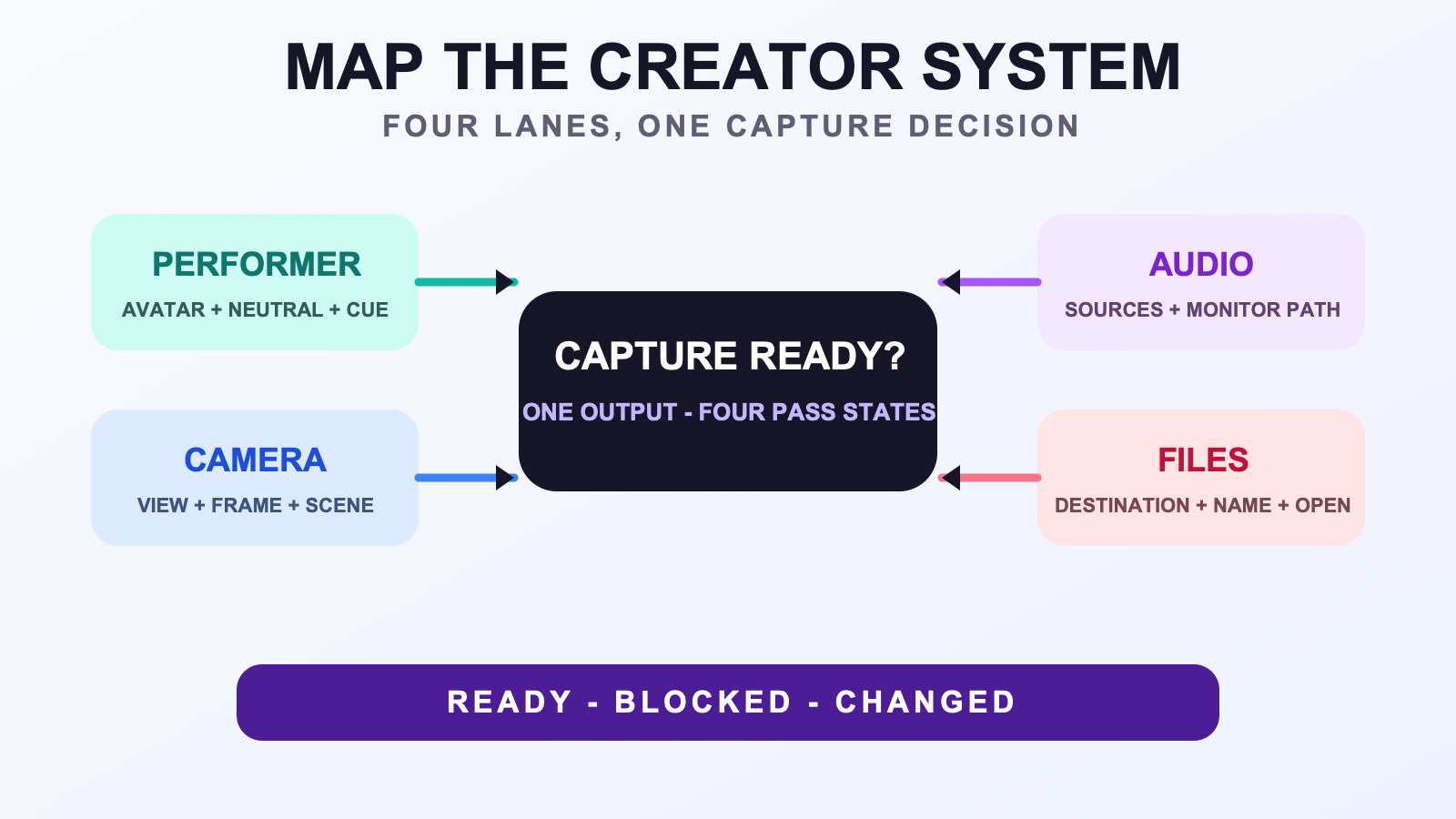
A social VR creator setup around FBT is a chain of dependencies, not a shopping list. Tracking can be ready while the camera frame, audio monitor, or destination folder is still blocked. A creator system map and preflight card make those states visible before capture by separating the performer, camera, audio, and file lanes.
The map does not certify compatibility or guarantee a clean recording. It records what this production expects, what evidence marks each lane ready, and where a blocker should be resolved. That keeps a creative session from becoming an improvised equipment audit.
Start with one intended output
Name the thing the system is meant to produce: a full-body avatar clip, a live social scene, a costume showcase, or a short movement reference. The output determines which parts of the avatar must remain visible, whether another person’s audio matters, which files must be saved, and what ends the capture.
A vague goal such as “creator setup” makes every device look equally important. A specific goal such as “one standing avatar explanation with a full-body example” gives the map a frame requirement, a spoken-audio requirement, a movement zone, and a recording destination. Write that sentence at the center of the map.
When the physical area is compact, complete the small-room setup check separately. The system map should record the allowed performer zone and any changed shot requirement; it cannot prove that a virtual boundary makes the physical area clear.
Draw four production lanes
| Lane | Decision | Ready evidence |
|---|---|---|
| Performer | Avatar, tracking baseline, movement zone, and content cue | Known neutral and one rehearsed content beat |
| Camera | View, framing, scene, and any reserved composition space | The intended body area remains visible in a test frame |
| Audio | Required speaker sources and how they are monitored | A short test can be heard through the chosen monitor path |
| Files | Destination, naming stem, and review responsibility | A test file saves, opens, and maps back to the shot |
Keep each row tied to the intended output. A silent pose clip may need only a simple audio note, while a group scene may require several speaking sources and a clear consent rule. The map should not prescribe a universal microphone, capture application, or platform setting.
For the performer lane, use the setup and calibration workflow to establish the technical baseline. Record the pass, blocker, or change on the system map instead of copying the full technical procedure into the creator plan.
Connect dependencies before adding gear
Draw an arrow when one lane cannot finish without another. The camera may depend on the performer zone. The file lane may depend on a camera source. The audio monitor may need to work before a live scene can begin. Label the arrow with the evidence that crosses it, such as “test frame approved” or “test file opened.”
This reveals the difference between a missing capability and a missing decision. If the camera source exists but nobody has chosen the active frame, buying another device does not close the gap. If the planned capture block depends on charged wearable equipment, use the charging and pre-session checklist, then record its outcome.
Mark every unresolved item as blocked rather than almost ready. A block should name its next action and the lane responsible for it. “Camera blocked: choose standing frame” is more useful than “test setup again.”
Turn the map into a preflight card
The preflight card is the small version used before a capture block. It should not repeat every cable, menu, or calibration step. It should confirm that the four lane outputs needed by this shot are ready and unchanged.
- Performer: known avatar, neutral, movement zone, and content cue.
- Camera: intended view is present and the required body area is visible.
- Audio: required sources were tested through the chosen monitor path.
- Files: destination, naming stem, and test-open check are known.
- Change check: any difference from the mapped version is recorded.
For a stream-focused output, the stream presentation guide can refine what the camera lane needs to show. The preflight card should carry the final requirement, not duplicate every presentation choice.
Route failures without rewriting the whole setup
When a lane fails, stop at the evidence that is missing. If neutral no longer looks known, return to the performer technical process. If a test file saves but cannot be opened, keep the problem in the file lane. If audio can be heard locally but not through the intended monitor path, do not change the camera to compensate.
This separation makes a change reversible. Record the previous mapped version, change one lane, and repeat only the affected dependency checks. A new camera frame may require another performer-zone check but not a new naming convention. A changed file destination does not require a new avatar test.
If the production will be repeated across the week, connect the approved map to the weekly VR content workflow. That board can track which clip is ready or reviewed, while the system map records what ready means for the production.
Test the map with one small capture
Run a short test designed to touch all required lanes: enter the performer zone, deliver one content cue, record through the chosen frame and audio path, save with the planned stem, then open the file. The result is not a performance test. It checks whether the mapped evidence can travel from intention to review.
For detailed home capture choices, continue with the home avatar recording guide. Keep the system test small. If the file reaches review, note one friction point and decide whether the map, the preflight card, or a separate checklist should change.
If the map confirms a stable need for waist and leg expression, compare those requirements with the current FBTKit product page. Verify the current compatibility route, contents, price, and terms there. This page does not establish those changing facts or promise that a product closes every mapped dependency.
FAQ
What are the four lanes in a social VR creator system map?
Use performer, camera, audio-monitoring, and file-review lanes. Define the decision each lane makes, the evidence that marks it ready, and any dependency that must cross into another lane before capture.
What belongs on a creator preflight card?
Record the ready state for the avatar and movement zone, intended camera view, required audio sources and monitor path, file destination and naming stem, plus any change from the approved map. Keep detailed procedures in their separate checklists.
Should I add equipment when one creator lane is blocked?
Not until the blocker identifies a missing capability. Many blocks are unresolved choices, such as an undefined frame or file destination. Name the missing evidence and next action first, then evaluate equipment only when the requirement is clear.
How do I test the creator system without recording a full project?
Run one short pass that enters the performer zone, uses one content cue, records through the intended camera and audio path, saves with the planned name, and opens for review. Note the first failed dependency rather than judging creative quality.
