
Jul
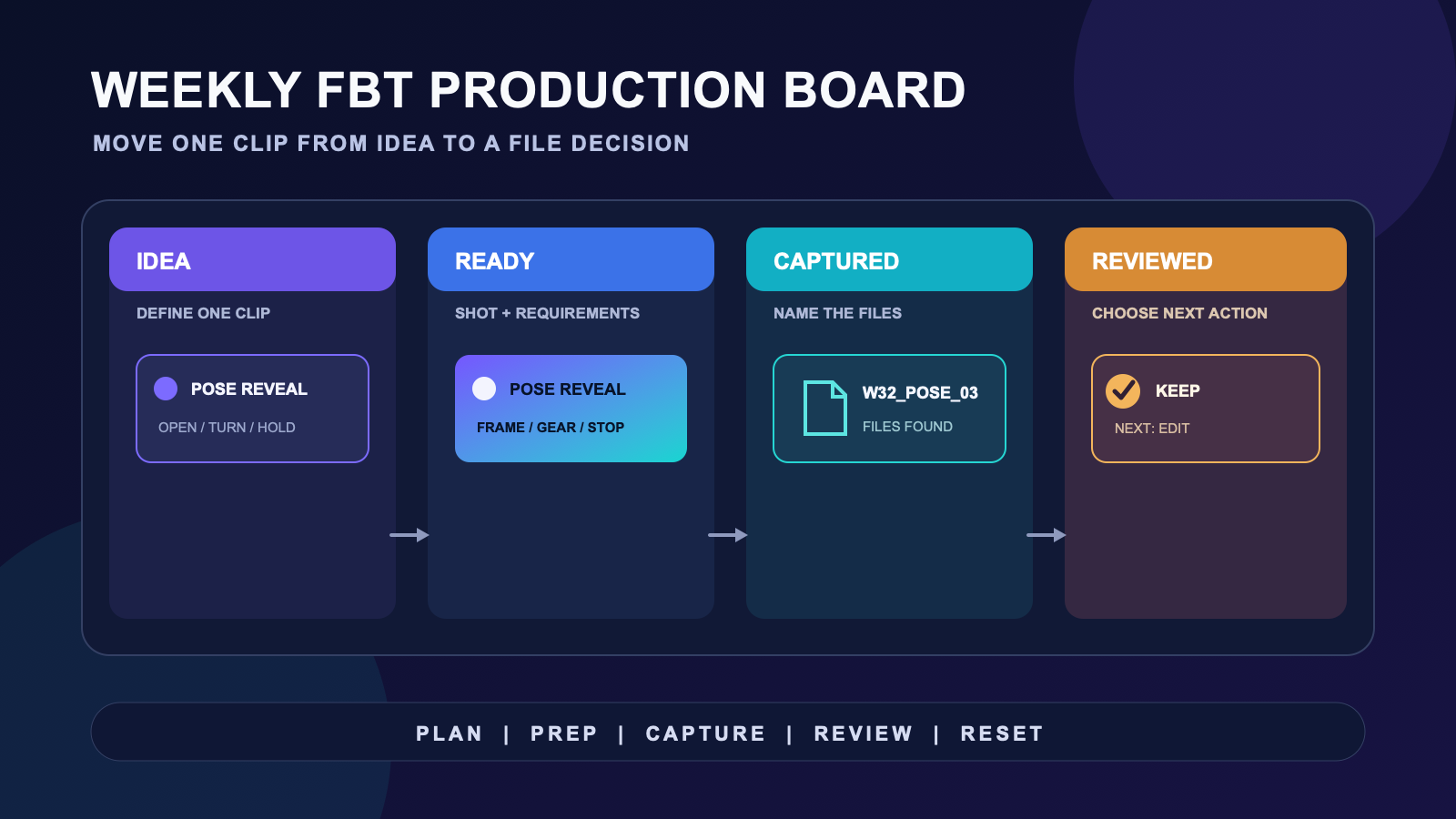
A weekly VR content workflow works best when every clip has a visible state. Use one weekly VR production board with four columns: Idea, Ready, Captured, and Reviewed. A card moves only when the evidence for the next state exists. That simple rule separates creative decisions from gear preparation, recording, and file review.
The board is not a promise to publish on a fixed schedule. It is a map of unfinished work. If a clip stays in Ready for another week, the card should show what blocks it. You can then change the shot, reserve a shorter recording window, or remove it without turning an incomplete idea into a personal failure.
Build the weekly production board
Create one card for one intended clip. Give it a working name, the avatar or scene, one movement idea, the required shot, and the next decision. Avoid a card such as “record content” because it hides several separate files and choices.
| Board state | Evidence required | Next action |
|---|---|---|
| Idea | A clear subject or movement moment | Write the clip card |
| Ready | Shot, avatar, location, gear needs, and stop rule | Reserve a capture block |
| Captured | Named files saved in the expected folder | Review without recording again |
| Reviewed | Keep, revise, recapture, archive, or publish decision | Move or close the card |
Keep the board small enough to scan. A work-in-progress limit of your own choosing is more useful than a universal number. When Ready is full, finish or remove a card before adding another. The limit protects capture time from an ever-growing idea list.
Write a clip card that can survive a busy week
A usable card answers what the camera needs to see. Write the opening pose, the movement beat, the ending pose, the framing, and the intended length range. Add the avatar and world only when they affect the shot. If a prop, mirror, camera operator, or second participant is required, put that dependency on the card.
Also write a stop rule. You might stop after a fixed number of clean takes, after the reserved time ends, or when the next take would repeat the same problem. The rule prevents a vague clip from consuming the rest of the session. It does not judge performance. It only closes the capture block at a point you chose before recording.
Dance clips need their own planning detail. The dance content planning guide can hold choreography and sequence decisions, while the avatar dance clip plan can handle the shot-specific preparation. Your weekly board only records the result and the next action.
Separate planning, preparation, and capture
Planning and recording compete for attention when they share one block. Use a short planning block to choose cards and remove ambiguity. Use a separate preparation block to charge, place, connect, and organize the equipment named on those cards. Start capture only after the Ready card matches the room and gear available that day.
Use the checklist dedicated to each technical task. The charging and pre-session checklist covers charge-state decisions. The cable and charging organization guide covers adapters and leads that slow down preparation. On the production board, record only a pass, a blocker, or a changed requirement.
This separation makes rescheduling plain. If preparation fails, the clip stays Ready and gains a specific blocker. You do not need to invent a weaker shot during the time reserved for capture. If the creative idea is incomplete, it returns to Idea even when every device is ready.
Use short capture blocks with named files
Before the first take, create the destination folder and a file stem that matches the card. A useful name can combine the week, card name, and take number. The exact format matters less than using it every time. Review becomes harder when files from several cards share camera-generated names with no connection to the board.
During capture, change one visible variable at a time. If you adjust framing, keep the movement beat the same for that pass. If you change the movement, record that note on the card. This keeps the later review tied to a decision instead of a memory of what might have changed.
For a home capture process, follow the home avatar clip guide. The weekly board does not need to duplicate camera placement or room instructions. It should show which guide and shot decision a card depends on.
Review files in a different block
Move a card to Captured only after the expected files exist and have recognizable names. Then leave the recording mode. Review asks a different question: which file communicates the intended pose or movement clearly enough for its purpose?
Give every reviewed card one of five decisions: keep, revise, recapture, archive, or publish. “Maybe” is not a state because it does not name the next action. A revise decision must say what changes in the edit. A recapture decision must name the visible problem and the one variable you plan to change.
Do not use this review to score your body movement or compare it with another creator. The board evaluates whether a file serves the card. It cannot prove tracking accuracy, artistic quality, audience response, or platform performance.
Close the week with a reset
At the end of the week, scan every open card. Archive ideas you no longer want. Return ambiguous cards to Idea. Keep only cards that still have a clear next action. Then record one friction point that affected the system, such as an unnamed file, a missing adapter, an overlong shot, or a card that depended on another person.
Route equipment friction rather than expanding this page into a care manual. The between-session storage guide covers how gear returns to a known place. If your board shows a stable need for an FBT route, you may compare the Core Full Body Tracking Kit with the requirements on your cards. Recheck the current product page before a decision because offer details can change.
Choose one small system change for the next week. Rename the default folder, shorten the capture block, add a dependency field, or reduce work in progress. Keep the rest of the board stable so you can tell which change removed the friction.
Frequently asked questions
What columns should a weekly VR content board have?
Use Idea, Ready, Captured, and Reviewed. A card moves when it has the evidence required by the next state, such as a defined shot, saved files, or a clear file decision.
How much work should one clip card contain?
One card should represent one intended clip. If a card contains several scenes, avatars, or unrelated movement beats, split it so each file can receive its own capture and review decision.
What should happen when a planned clip is not recorded?
Keep it in Ready only if the shot and next action still make sense. Add the specific blocker, return it to Idea when the concept needs work, or archive it when you no longer want to make it.
Should planning and recording happen in the same session?
They can, but they should remain separate blocks. Finish the card and equipment decisions first, then start the reserved capture block with a defined shot and stop rule.
How do I decide whether a captured file needs another take?
Compare the file with the card’s intended pose, movement beat, framing, and purpose. Choose keep, revise, recapture, archive, or publish, and name the one visible issue before scheduling another take.
Official reference
Use the VRChat full body tracking documentation for current platform-level feature and setup information. A weekly production board does not replace current official documentation.
