
Jul
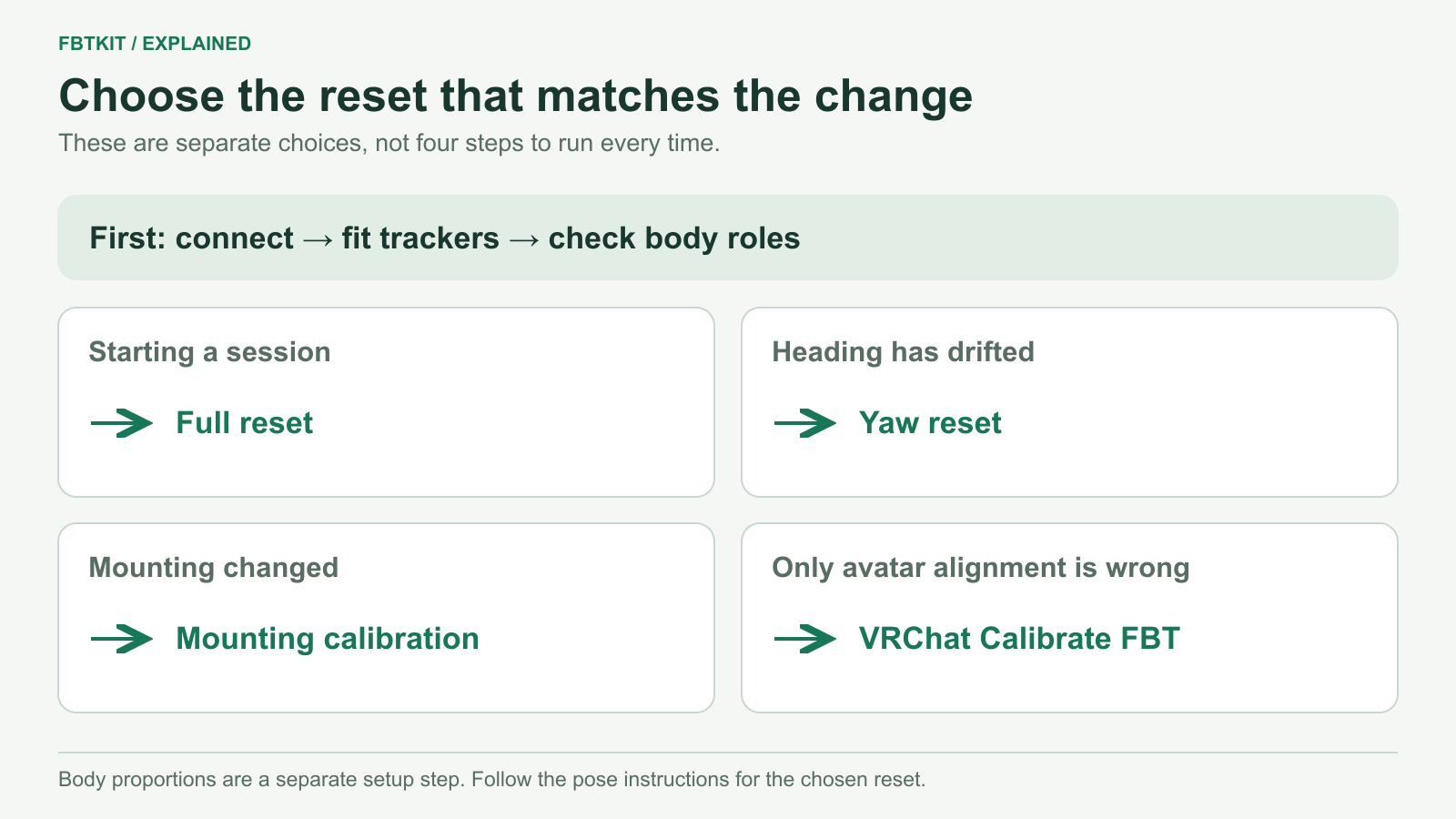
For an already configured SlimeVR setup, start each session by connecting the trackers, checking their fit and roles, performing a full reset, and confirming mounting orientation before calibrating your avatar in VRChat. Later, use a yaw reset for a heading error; redo mounting calibration when the tracker-to-body orientation has changed. These actions solve different problems.
This routine assumes the trackers have already been connected and assigned. If this is your first session, complete the Windows SlimeVR setup guide first. The steps below describe the SteamVR route; OSC-only users should follow the mounting and headset-data options available for their setup.
Your start-of-session routine
1. Connect the set before putting it on
Open SlimeVR Server and check that the intended trackers appear. For the prebuilt workflow in SlimeVR Quick Setup, leave powered-on trackers still on a flat surface while their startup sensor calibration completes. Follow the prompt for your hardware instead of guessing a waiting time.
A missing tracker needs a connection check, not a reset. Use the tracker detection guide if the set is incomplete.
2. Check fit, body roles and direction
Wear each tracker in its saved position. Check left and right, make sure the holders cannot twist, and look for a strap caught over a seam or pocket. A tracker moved from Hip to Waist needs the corresponding role change; those names are not interchangeable. Use the placement map if a location is uncertain.
Start SteamVR and put on your headset. Confirm the floor and playspace are where you expect them before calibrating.
3. Perform a full reset
Stand upright with your legs vertical and comfortably separated. Keep the trackers facing their assigned mounting directions. Start the full reset in SlimeVR, look forward, and hold the pose through its countdown. Do not lean down to watch your feet as it finishes. This is the stance described in SlimeVR’s tracker configuration guide.
Then bend a knee and gently turn. The virtual body should be beneath you and move in the same direction. Precise joint alignment also depends on the saved body proportions.
4. Check mounting orientation
If you use automatic mounting, follow the mounting wizard, including its illustrated ski pose. On the SteamVR path, keep SteamVR running and wear the headset. If you use manual mounting, confirm that each saved direction matches how the device is worn. Automatic mounting can overwrite manual directions, so do not trigger it casually to try to improve an unrelated symptom.
If a tracker changed angle while you were putting it on, fix the physical fit before repeating this step. Mounting calibration cannot hold a loose strap in place.
5. Calibrate the avatar you will use
In VRChat, choose your avatar and open Calibrate FBT in the Quick Menu. Check your height setting and playspace, align the tracker markers and your stance, then stand straight and look forward before pressing both Interact buttons together, usually the controller triggers. Follow VRChat’s current calibration instructions if the interface differs.
Before joining friends, try a small step, a turn, a gentle bend and a sit-to-stand if you plan to sit. A quiet home or private world gives you room to notice a shifted strap without making the group wait. If an unfamiliar avatar behaves differently, use the avatar checking guide.
Full reset, yaw reset or mounting reset?
| What changed? | Action | What it changes |
|---|---|---|
| You are starting a session, or the whole skeleton has an orientation error. | Full reset, after checking fit and roles. | Zeros pitch and roll and aligns yaw to the head reference. |
| The setup began correctly, but heading has gradually turned while mounting remains stable. | Yaw reset, also called quick or fast reset. | Realigns heading without zeroing pitch and roll. |
| You changed how a tracker faces on its assigned body part. | Update manual mounting or repeat the automatic mounting wizard. | Sets the relationship between tracker orientation and body orientation. |
| SlimeVR moves correctly, but only the current avatar is offset or poorly aligned. | Check avatar height and VRChat FBT calibration. | Aligns the application’s avatar with the incoming tracking. |
The three SlimeVR reset definitions come from its official terminology guide. For a yaw reset, face forward with the trackers aligned to their defined forward directions; looking one way while your body points another gives the reset a poor reference.
When body proportions need attention
Body Proportions sets the skeleton’s segment lengths. It is not a reset you need to repeat every time you put on the kit. Revisit it when saved measurements are wrong or a different person uses the setup.
Before running AutoBone, fix connection and mounting problems and complete a full reset. SlimeVR needs working headset positional data and correctly moving trackers. Wear the headset, follow the recording prompts and keep your heels planted in the same positions. Check the resulting values before accepting them. The Body Proportions guide explains both automatic and manual methods.
Make the next correction easy
Set a reset binding before a social session. SlimeVR’s binding guide shows how to choose SlimeVR-Bindings-Provider in SteamVR’s controller binding interface and assign a reset action. Try the chosen button while standing in the required pose before relying on it in a busy world.
If one leg moves backward immediately, check its body role and mounting before trying repeated resets. If alignment gradually deteriorates again after a yaw reset, use the drift guide. If the symptom is unclear, start with the troubleshooting guide.
Software documentation checked September 29, 2026. This is a documentation-based routine; it does not report an FBTKit hardware test.
