
Jul
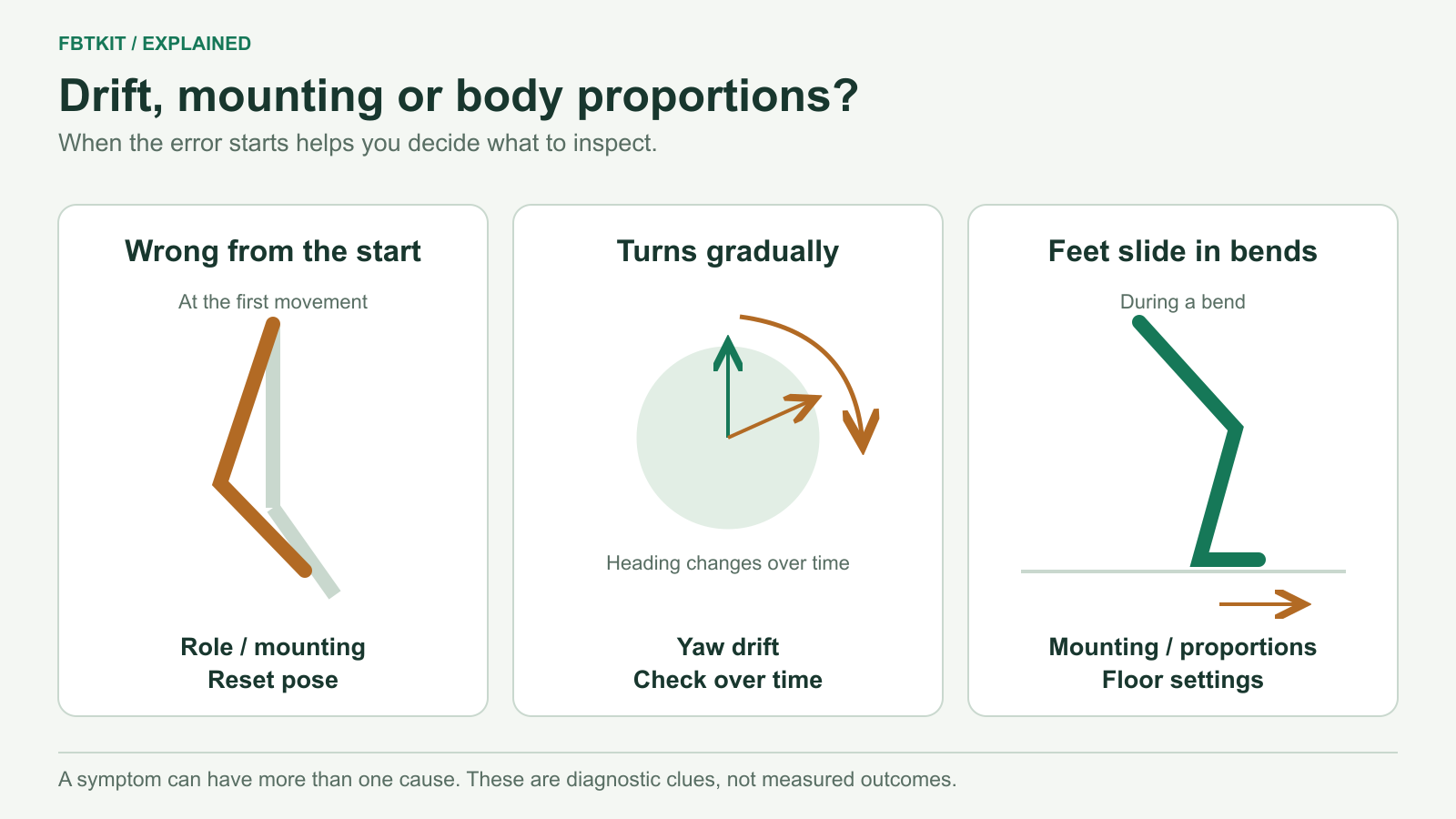
To fix apparent SlimeVR drift, first identify how the error develops. A foot that slowly turns sideways after starting correctly suggests yaw drift. A leg that points the wrong way immediately suggests assignment or mounting. Feet that slide during bends can indicate a proportion or floor problem. Repeating the same reset will not fix all three.
First: make sure the tracker did not move on your body
Check the strap and case before touching software settings. Has a thigh tracker rotated, a lower-leg strap slipped, or the chair pressed a hip tracker into a different angle? Put it back in a stable position, then repeat mounting calibration if its orientation changed.
This is physical movement of the sensor relative to your body. It can create an alignment error while the sensor remains connected. Use the strap fitting guide if the problem returns whenever you move.
If only one leg changes, compare that side’s sensors, straps and assignments with the working side. If the whole skeleton rotates or shifts together, check the shared headset/playspace reference and whether a recenter occurred. These patterns help choose the next check; neither alone proves the cause. SlimeVR’s reset-binding guidance notes that resetting the playspace requires a tracker reset too.
Wrong immediately: check roles and mounting
Move one leg slowly while watching the SlimeVR skeleton. If the opposite leg responds, identify the physical sensor and correct its left/right role. If the correct leg moves in the wrong direction, check its mounting orientation and run automatic mounting calibration again.
Keep Lower Leg sensors at the ankle area and Foot sensors on top of the feet, using the documented axes. They are distinct roles. A Hip sensor at the belt line is also different from a Waist sensor above it. The placement map shows these locations.
Repeat the same movement after the correction. If it is still wrong from the first movement, keep investigating mounting and calibration. SlimeVR’s terminology guide distinguishes a persistent mounting error from drift that accumulates over time.
Gradual sideways rotation: use a yaw reset
If the straps stay put and alignment gradually rotates during use, return your head and tracked body segments to a forward-facing orientation and trigger SlimeVR’s yaw reset, also called a quick reset. Check whether the previously rotated leg or foot now faces the intended direction.
A yaw reset corrects heading alignment. It does not measure your body proportions or correct an incorrectly assigned sensor. Use SlimeVR reset bindings to make this action accessible during a session. Check your configured binding rather than assuming a particular tap gesture works on every device.
There is no single reset interval that this guide can promise for every FBTKit model, firmware version and activity. If the same sensor quickly develops a large rotation error after a correctly posed reset, check its startup and IMU calibration instructions next.
Persistent drift: check sensor calibration
Allow the trackers to initialize on a stable, still surface according to their hardware and firmware instructions. Manual IMU calibration is separate from a session yaw reset. The procedure depends on the sensor and firmware; SlimeVR documents a different process for LSM6DSV and other sfusion IMUs than for some older sensors.
Confirm the actual sensor before following the IMU calibration instructions. If a purchased tracker repeatedly reports an error or remains unstable after the applicable procedure, send the supplier the model, firmware and affected sensor entry. Do not apply a procedure intended for another IMU.
Feet slide or sink: compare floor and body proportions
With all trackers responding, try a shallow bend with your real feet planted. Watch whether SlimeVR’s estimated feet move away from those fixed positions. If they do, confirm mounting first, then revisit body proportions. SlimeVR estimates joint positions from a body model; an incorrect length can produce movement that a yaw reset cannot remove.
For AutoBone, use the headset and all required sensors, keep your heels in the same positions during recording, and review the resulting measurements before accepting them. Do not tune your real body lengths just to make one stylized avatar look better. Use the body-proportion guide for the complete procedure.
If the entire avatar is consistently too high or low, check the headset’s floor boundary and your height settings. If SlimeVR looks correct but the problem appears only on one avatar, continue with avatar fit and calibration. Floor-clip and skating-correction settings are not a replacement for correct mounting, proportions and floor alignment; their availability also depends on the route and version.
A sudden jump is a different clue
If tracking freezes and then jumps, check whether sensor updates paused in SlimeVR. An interruption points toward the connection path, rather than proving gradual IMU drift. If the error starts exactly when you sit, inspect chair contact using the seated tracking guide.
Sources checked September 29, 2026. This guide separates documented fault types; it does not claim measured drift rates or reset intervals for FBTKit hardware.
