
Blog
Full Body Tracking for VTuber and Avatar Content
Jul
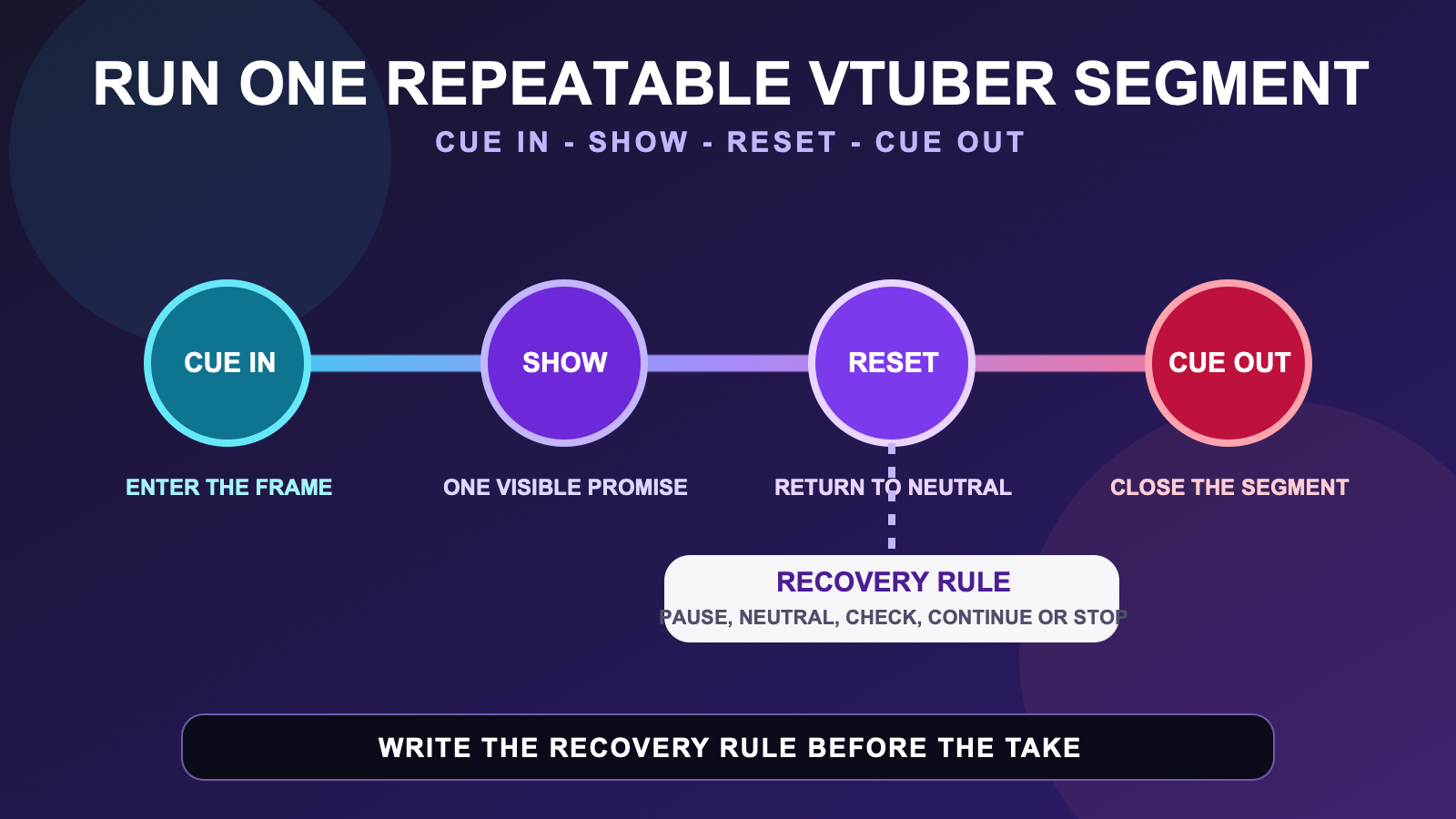
Full body tracking for VTuber content is easier to repeat when one full-body appearance is treated as a defined segment rather than an open-ended recording session. A vtuber segment run sheet states how the avatar enters, what the viewer should notice, where neutral sits, how a demonstration ends, and what cue closes or resets the segment.
The sheet cannot guarantee audience attention, platform performance, tracking quality, or a convincing performance. It creates a shared record for the creator, camera operator, editor, or future self. Technical preparation remains a separate job.
Define one promise for the segment
Write one sentence that describes what becomes visible because the segment uses the whole avatar. It might be a costume reveal from front to three-quarter view, a standing explanation with two deliberate body examples, a character entrance, or a short movement comparison. The promise should describe the content, not the equipment.
Avoid a goal such as “use full body tracking for five minutes.” Duration does not tell anyone what to frame or what the viewer should understand. A useful goal is “show the costume silhouette at neutral, then compare two character stances.” That sentence gives the run sheet a beginning, middle, and finish.
If the surrounding creator system is still unclear, use the social VR creator setup guide to map performer, camera, audio-monitoring, and file lanes. This segment page assumes those lanes exist and focuses on the cues that move content through them.
Write four visible stages
| Stage | Run-sheet decision | Observable check |
|---|---|---|
| Cue in | The line, sound, or action that starts the full-body view | The avatar reaches the planned mark before the main beat. |
| Show | One or two body-level examples | The frame keeps the intended silhouette visible. |
| Reset | A known neutral plus a recovery choice | The creator can pause without pretending the segment is continuing. |
| Cue out | The phrase, action, or camera change that closes the segment | The full-body portion has an unambiguous end. |
Keep the rows short enough to scan before the segment. Write spoken lines only when exact wording matters. Otherwise, use the purpose of the line, such as “invite comparison” or “signal return to desk view.” The run sheet should reduce memory load, not become another script to read.
Mark the active frame and the neutral frame
The active frame is the composition needed for the segment promise. The neutral frame is the view and posture used to begin, pause, or recover. They may be the same composition, but they serve different decisions. Record whether the full avatar must remain visible, where the feet should appear, and which side of the frame leaves space for text or another participant.
Test an unfamiliar model before rehearsing content. The new-avatar testing guide helps separate model behavior from the run-sheet choices. If the desired presentation is specifically a polished stream view, continue with the stream presentation guide after the segment structure is stable.
A frame note is descriptive, not a promise that every platform or camera route exposes the same controls. Record the route actually used in the production file, and verify current platform documentation separately.
Add a recovery rule before rehearsal
A recovery rule says what happens when neutral no longer looks like the known baseline, a required body part leaves the intended frame, or the creator loses the next cue. Choose a visible pause, a return to neutral, a camera change, or a stop-and-restart point. The rule should protect clarity, not disguise a persistent technical symptom.
- Pause the content beat instead of layering improvisation over uncertainty.
- Return to the named neutral and check the intended frame.
- Stop the take when the baseline does not return as expected.
- Record the symptom for the relevant technical workflow.
For recorded content, the recovery may become an edit point. For live content, it may be a planned camera or conversation transition. The same run sheet can describe both, but keep separate versions when the timing or audience interaction changes.
Rehearse cues separately from equipment preparation
First rehearse cue-in, show, reset, and cue-out as a sequence. Do not add new creative beats while also changing tracker placement, avatar settings, camera framing, and audio. If equipment preparation or room decisions remain open, resolve them before evaluating whether the segment reads clearly.
When the work is recorded at home, consult the home avatar recording guide for the capture process. Keep this run sheet concerned with content stages and recovery. A separate record for technical preparation makes it possible to repeat the segment without copying every old troubleshooting note into the script.
Run one cue-only pass without trying to make it publishable. Check whether the entrance lands, whether the intended example fits the frame, whether neutral is easy to find, and whether the ending is obvious. Then choose one question for the recorded or live rehearsal.
Review the segment and version the sheet
After the pass, answer one observable question: Did the costume reveal reach the planned angle? Did both stances remain readable? Did the reset interrupt the explanation? Write the answer beside the relevant row. Avoid a general verdict such as “good segment,” because it gives the next version no instruction.
Name the sheet by segment and version. If the only change is a spoken cue, note it. If the active frame, avatar, or demonstration changes, create a new version. The weekly VR content workflow can then track which version is ready, captured, or reviewed.
A short vertical edit is a different deliverable. Use the short avatar clip guide when the hook, vertical crop, and edit points define the work. The VTuber segment run sheet is built for a reusable content block, even when part of it later becomes a clip.
Check whether the tracking route matches the segment
The run sheet reveals which body-level moments matter. If those moments depend on waist and leg expression and you are ready to verify the full setup route, inspect the current FBTKit product page. Confirm the live offer, compatibility, contents, price, and terms there. This article does not establish those changing facts or guarantee a creator result.
FAQ
What belongs on a VTuber segment run sheet?
Record the segment promise, cue-in, active frame, one or two visible demonstration beats, neutral position, recovery rule, and cue-out. Add the avatar and sheet version when they affect how the segment is repeated.
Can the same full-body segment plan work live and recorded?
Yes, when the visible stages stay the same, but keep separate versions when timing, audience interaction, camera changes, or recovery choices differ. A recorded recovery may become an edit point while a live recovery needs a visible transition.
How long should a VTuber full-body segment be?
Use the time needed to deliver the one segment promise and complete its cue-out. Do not choose duration only to fill a schedule. Rehearse the visible stages, then shorten or divide the segment when the purpose becomes unclear.
What should I do if the avatar does not return to neutral?
Pause the content beat and use the recovery rule. Recheck the avatar, body assignments, wear position, and calibration through the relevant technical process. Do not hide a persistent symptom by adding more performance cues.
