
Jul
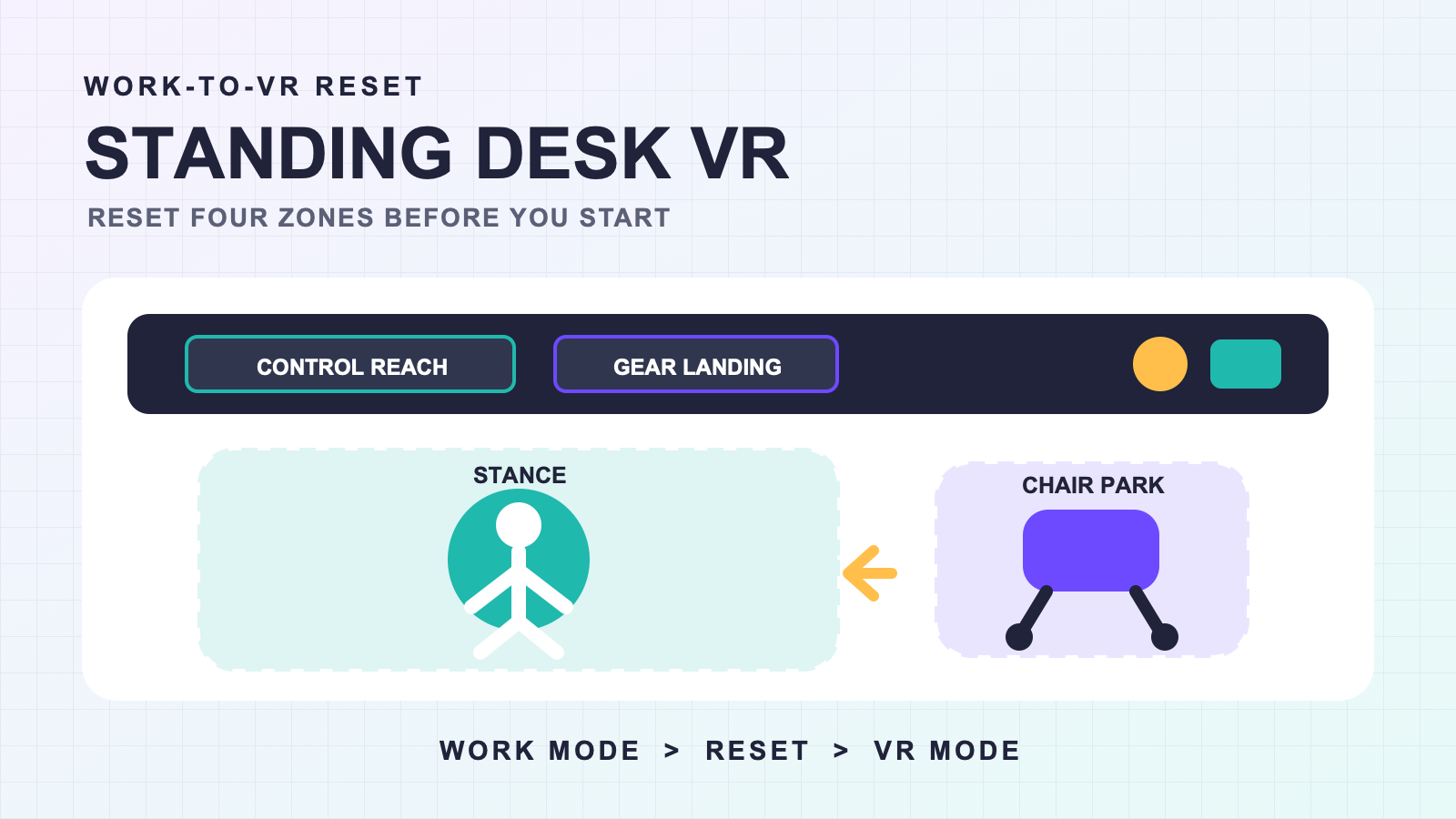
Full body tracking for standing desk VR setups becomes easier to repeat when the shared room has four defined zones: a neutral stance, a place to park the chair, a safe way to reach essential controls, and one landing spot for gear. The desk does not create a play area by itself. A short work-to-VR reset is what turns the same space into a usable session setup.
This approach is for people whose monitor, keyboard, chargers, headset, and tracking gear all live in one place. It does not require a studio makeover. It asks you to decide where ordinary work objects go before you are wearing a headset and trying to find them by touch.
Draw the four-zone map
Start with the room in its normal work state. Stand where you would naturally put on the headset and look at what blocks a turn, a step back, or a reach toward the desk. Then assign four zones on a rough sketch:
- Stance: the neutral place where setup and simple movement checks begin.
- Chair parking: a position the chair can return to without rolling into the stance.
- Control reach: the keyboard, mouse, audio control, or button you may need without leaning across a tracker.
- Gear landing: the tray or surface where each item goes before and after the session.
If the room cannot hold those four functions without overlap, solve the overlap before adding a larger movement plan. The small-space room guide covers the broader room-layout decision. This article stays with the desk transition.
Reset the work area in the same order
A standing desk changes throughout the day. The chair moves. A charging lead drops. A bag appears beside the desk. The desktop fills with objects that seemed harmless while seated. A repeatable reset should reverse those changes in the same order each time.
- Return the desk to the height you plan to use during VR.
- Park the chair in its marked place.
- Clear the stance and the path to it.
- Move loose leads out of the route you will step through.
- Place gear in the landing zone before wearing anything.
- Check that the one essential control remains reachable.
Deep charging and cable decisions belong in the cable and charging organization guide. The gear storage guide covers what happens after the session. Here, the point is that their locations must not change the stance or chair parking zone.
Test the desk contact you will actually use
Standing-desk users often need one or two controls during a session. Reaching for them is part of the setup, not an exception. Wear and prepare the system using its normal instructions, then test the exact reach you expect: mute, start or stop a recording, adjust audio, or return to a desktop view.
Do the reach slowly. Notice whether your hip or leg meets the desk edge, whether a strap changes position, and whether the chair forces you to twist. Return to the neutral stance and repeat once. If the same issue appears, change the physical route before changing several software settings.
Use the setup and calibration workflow for the tracking system’s main procedure. A desk-contact test only checks whether normal desk use changes the physical setup after that procedure.
| Desk action | What to observe | Decision |
|---|---|---|
| Reach for keyboard or mouse | Desk-edge contact, twisting, or strap movement | Move the control closer or change the approach path |
| Step back into the stance | Chair wheels, mat edges, or loose leads | Restore the zone before continuing |
| Sit and stand again | Chair parking and any position that changed under contact | Use the seated VR guide if the chair is the recurring issue |
| Raise or lower the desk | Cable path and objects that enter the movement area | Choose one session height or rerun the reset after a height change |
Keep sitting as a separate branch
Many standing-desk sessions include a chair. That does not make the standing map a seated setup guide. The chair has one job here: leave the stance when you stand and return to a predictable place when you sit.
If chair contact changes tracker position or the avatar behaves differently while resting, use the seated VR session guide. Keeping the two checks separate makes the cause easier to see. First confirm the desk zones. Then confirm the chair configuration.
Use a stop rule for constrained rooms
A desk setup can support small posture changes, avatar checks, or social movement without supporting every activity. Do not let the words “standing desk” imply space that is not there. Decide what movement the session needs, then confirm that the stance and surrounding route can accommodate it without improvising around furniture.
The active VR safety guide covers broader safety planning. A useful stop rule for this page is narrower: if you cannot keep the intended desk, chair, controls, and movement route predictable, change the activity or the room before continuing.
When the room and routine are stable but starting still feels difficult, the spontaneous-session readiness guide can help reduce between-session friction. It does not replace the four-zone map.
Check the route before the product
A standing desk does not confirm headset, app, or tracker compatibility. Use the VR full body tracking compatibility checklist for that decision. Once the route and room fit are understood, review the current FBTKit product listing. The product page cannot prove that your desk layout has enough space or that your preferred controls are reachable.
Save the reset, not a perfect room
Take one photo or draw one simple map after the stance, chair, controls, and gear locations are settled. Use it to restore the room after work instead of designing the setup again every night.
FAQ
Does a standing desk count as a VR play area?
No. The desk is one object inside the room. You still need a predictable stance, chair position, control path, and movement route that fit the activity you plan to use.
Where should the chair go during standing VR?
Park it in one repeatable place outside the neutral stance and the route to essential controls. Mark that location if the chair tends to roll back into the setup.
Should I move my keyboard before every session?
Only if its normal position forces an awkward reach or brings you into contact with the desk. Keep essential controls reachable, but test the reach before the session begins.
What if I change the desk height during VR?
Treat the height change as a layout change. Recheck the control reach, cable path, and any object that moved into the stance before continuing.
When is a standing-desk room too constrained for the plan?
Stop when the intended movement cannot fit without stepping around furniture, loose leads, or a drifting chair. Reduce the movement plan or use another room instead of improvising in the headset.
