
Jul
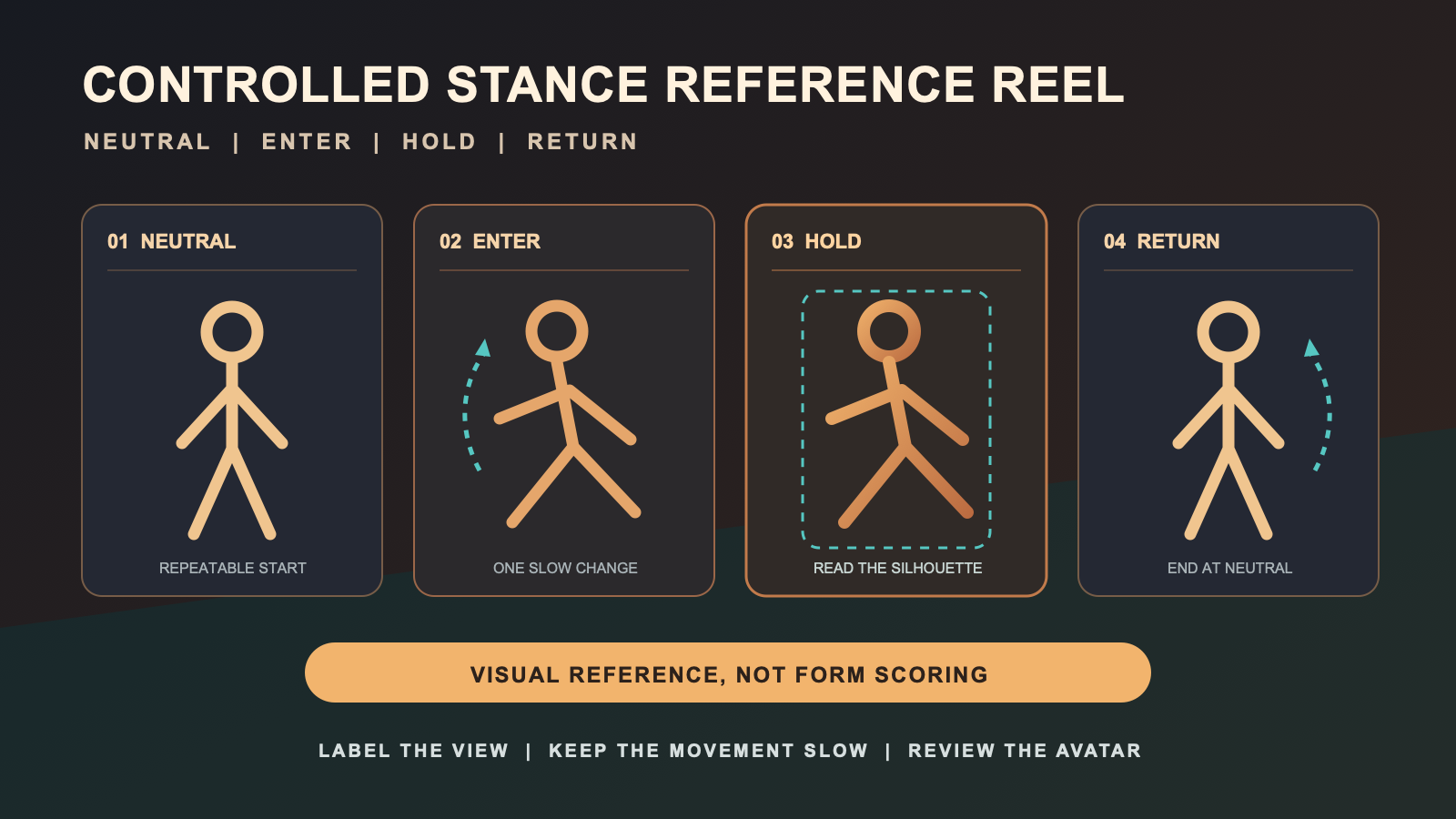
Full body tracking can help you record a controlled avatar stance reference reel, but the reel should stay within a clear visual purpose. Capture a neutral start, a slow entry into one named shape, a still hold, and a slow return. Review how the avatar reads on screen, not whether the real-world technique is correct.
This distinction matters. Consumer FBT footage is not a martial arts lesson, a biomechanics measurement, or a performance assessment. It cannot establish that a stance is safe, effective, authentic, or ready for practice outside VR. The workflow below produces organized visual references for creative work.
Define the reference before you move
Start with the reason the clip needs to exist. A character artist may want a clear silhouette. A video editor may need a transition reference. An avatar creator may want to compare how one shape reads across models. Write that purpose at the top of a stance card.
Then give the shape a neutral project name. The name can describe the screen image, such as “wide guard silhouette” or “forward profile hold,” without claiming a formal style, rank, or technical correctness. If you are documenting a named tradition, use terminology supplied by a qualified source and keep this page’s workflow focused on capture.
The stance card should include the avatar, starting orientation, selected camera view, entry cue, hold cue, return cue, framing, file stem, and stop rule. It should not prescribe foot distance, joint angle, force, repetitions, speed, or training duration.
Use a controlled four-part clip
Record each reference as four visible parts: Neutral, Enter, Hold, and Return. Begin from the same neutral presentation used by the other clips in the reel. Move slowly into the planned avatar shape, pause long enough for the camera to show it, and return without adding a second action.
| Clip part | What the file should show | Review question |
|---|---|---|
| Neutral | The repeatable starting silhouette | Can later clips start from the same visual state? |
| Enter | One slow transition into the named shape | Can the viewer follow the avatar change? |
| Hold | The planned shape without a second action | Is the silhouette readable in this frame? |
| Return | A slow return to the neutral presentation | Does the clip end where the next reference can begin? |
This sequence is intentionally limited. Fast combinations, contact, falls, weapons, jumps, and forceful movement are outside the reference-reel workflow. If a project depends on those actions, obtain appropriate real-world instruction and production safeguards rather than extending this article into unsourced advice.
Select camera views by reference need
A reel does not need every possible angle. Choose the minimum views that answer the creative question. A front view may show left-to-right balance in the avatar silhouette. A side view may show the profile and the relationship between upper and lower body. An oblique view may reveal overlap that disappears in a flat view.
Write the chosen view on the stance card before capture. Keep camera distance and crop stable across clips that will be compared. If the purpose changes, make a new card rather than quietly changing the camera and calling the files equivalent.
For a broader motion-reference workflow, hand that task to the motion reference clip guide. If the project is only about holding avatar poses without the martial-arts context, use the avatar pose practice guide. This page keeps the narrower controlled stance reel.
Prepare the avatar and capture route separately
Test the avatar before recording the stance reel. A model can change how the same tracked input appears because proportions, rigging, or avatar settings differ. Use the new avatar FBT test for that evaluation. Record the tested avatar version on the stance card so later clips can be traced to the same presentation.
Use the setup and calibration workflow for the technical route, and the small-room setup guide for space decisions. The reference reel needs only a readiness note and a reason to stop if the available room or route does not match the card.
For wearable stability, consult the tracker strap tension guide rather than adding pressure or fit instructions here. Do not continue a capture block through discomfort or treat the reel as a reason to ignore a physical warning.
Name each file before reviewing it
Use a file stem that connects the clip to its card. Include the project, stance-card name, camera view, and take number. For example, a consistent pattern might reserve one field for `FRONT`, `SIDE`, or `OBLIQUE`. The exact punctuation is less important than keeping every file traceable.
After capture, confirm that the expected files open and match their labels. Do not rely on the thumbnail alone. Move the card to review only when the file and view can be identified without reconstructing the session from memory.
If you are choosing an FBT route for this project, first list the supported platform path, available room, wearing routine, and file workflow. Then you can compare the Core Full Body Tracking Kit with those requirements as one current product page. Recheck live details before deciding because commercial fields can change.
Review avatar readability, not technique
The review asks whether the visual reference serves its creative purpose. Check whether the whole avatar remains in frame, the silhouette can be read, the named view matches the card, and the Neutral, Enter, Hold, and Return parts are recognizable. Also check whether file labels and avatar version notes are complete.
Do not score balance, power, alignment, effectiveness, realism, skill, or physical safety. The clip does not provide the evidence required for those judgments. If the reel will inform real-world instruction, a qualified person must define and evaluate that separate use.
Finish each card with one file decision: keep as reference, recapture for a named visual problem, revise the label, or archive. A recapture note should say what the camera failed to show. It should not diagnose the person or claim that their technique needs correction.
Frequently asked questions
Is a controlled stance reference reel a martial arts lesson?
No. It is an organized set of avatar clips for visual reference. It does not teach technique, establish correctness, assess physical performance, or replace instruction from a qualified person.
How many camera views should a stance reel include?
Use only the views required by the creative project. Front, side, and oblique views are options, not a required set, and each selected view should be written on the stance card before capture.
What belongs on a stance reference card?
Record the purpose, neutral project name, avatar version, starting orientation, camera view, entry cue, hold cue, return cue, framing, file stem, and stop rule.
Can FBT footage tell me whether a stance is correct?
No. The footage can show how an avatar appears in a captured view, but this workflow does not verify technique, biomechanics, safety, effectiveness, or authenticity.
What should I do if the reference requires fast or forceful movement?
Treat that as outside this controlled workflow. Do not extend a slow visual-reference process into fast combinations, contact, falls, jumps, weapons, or forceful action without appropriate real-world instruction and production safeguards.
Official reference
Check the VRChat full body tracking documentation for current platform-level information. Official documentation can explain the feature path, but it does not turn an avatar clip into technique evidence.
