
Blog, Comparisons
How Many Trackers for Full Body Tracking? 5, 6, 8 or 10
Jul
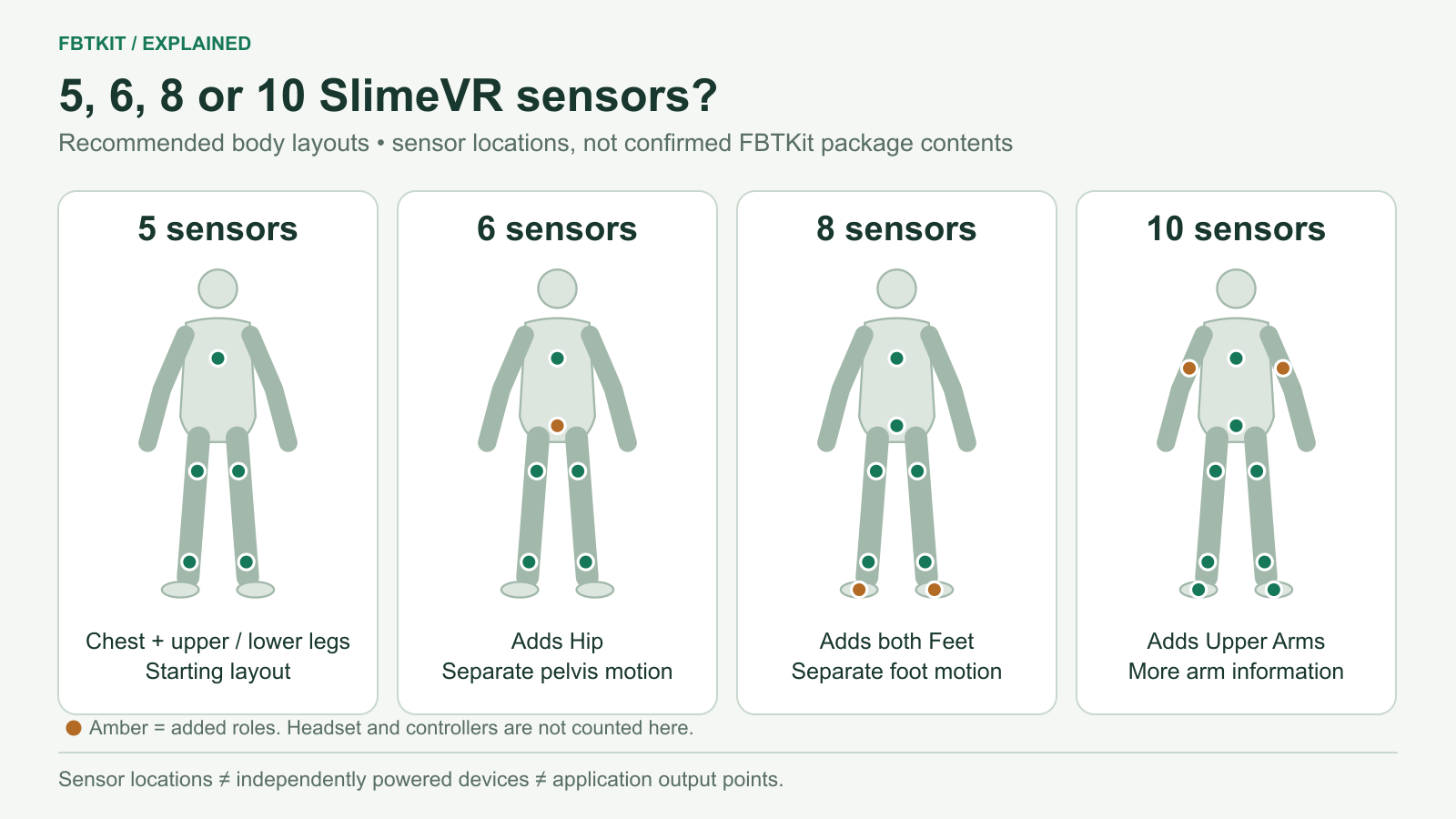
For the SlimeVR layouts compared here, choose 5 sensors for basic leg and torso tracking, 6 to add a separate hip measurement, 8 to add foot rotation, or 10 to add upper-arm measurements for elbow movement. These are sensors worn on your body. They do not include your headset or controllers, and they are not the number of virtual trackers you must send to VRChat.
If you are buying your first kit, six is a useful starting point when you want hip movement as well as legs. Five keeps the initial purchase smaller; eight makes sense when how your feet turn matters; ten is worth considering when you want to control elbow placement as well as hand position. This is a recommendation based on documented body coverage, not a tested ranking of FBTKit hardware.
What changes between 5, 6, 8 and 10?
| Sensors | Body roles in this layout | Why choose it? |
|---|---|---|
| 5 | Chest; left and right Upper Leg; left and right Lower Leg | Start with legs and torso while keeping the wearable count down. |
| 6 | The five above, plus Hip | Measure pelvis orientation separately from the chest. |
| 8 | The six above, plus left and right Foot | Add information about how each foot rotates relative to its lower leg. |
| 10 | The eight above, plus left and right Upper Arm | Add information about upper-arm direction for elbow positioning. |
These role combinations follow SlimeVR’s recommended placement table. The table describes a configuration you assign in software, not factory assignments for an FBTKit package. Other layouts exist, including ones with a separate Waist sensor.
Five versus six: what does the hip sensor add?
Try a small movement: keep your chest facing forward and gently turn your pelvis. Your chest and pelvis can have different orientations. The sixth sensor gives the system a separate measurement at the pelvis instead of leaving that part of the pose to estimation.
That is why six is a sensible option if your ordinary sessions include sitting, leaning or changing your torso pose. If your budget only allows five, you can still use the five-sensor layout; understand which measurement it leaves out rather than expecting a completely rigid or missing lower body.
Hip and Waist are different SlimeVR roles. Hip sits at belt level on the pelvis; Waist is higher, near the navel. The sixth sensor in this table is Hip. Moving it upward and keeping its old assignment is not a way to add a Waist role. Use the placement guide when you mount it.
Six versus eight: foot orientation is a separate measurement
A Lower Leg sensor near your ankle follows your lower leg. A Foot sensor on the top of your foot follows your foot. To feel the distinction, sit with your lower leg still and gently point your toes, then bring them back toward you. The foot changes angle without the shin making the same movement.
Consider eight when toe direction and foot poses are part of what you want to express, including seated poses or deliberate footwork. Six can still produce an estimated foot pose; adding Foot sensors supplies information the lower-leg sensors cannot measure on their own. It does not promise that every foot slide or floor-height problem will disappear.
Eight versus ten: your hands do not fully describe your elbows
Hold one controller in roughly the same place and move your elbow outward. A similar hand position can belong to several arm poses. Upper Arm sensors help distinguish those poses, which is useful when elbow position matters to a gesture, dance or character performance.
In this layout, the two extra sensors are worn above the elbows; they are not placed on the elbow joints. Ten is a reasonable choice if you specifically want that extra arm information and will wear the additional sensors. You do not need to start at ten merely because you plan to dance: decide which movements you want your first setup to represent.
Three different numbers appear on tracker listings
- Wireless devices
- The primary units that communicate with the host. Their number helps determine charging and connection work.
- IMU sensors
- The sensors measuring body-segment orientation. A cabled auxiliary sensor, or extension, can add a measurement without adding a separately powered wireless unit.
- Application output points
- The virtual positions sent to an app after SlimeVR constructs a body model. These do not have to match the sensor count one for one.
For example, SlimeVR explains a 6+2 set as six primary units with two auxiliary sensors: eight IMUs in total. That explains the notation; it is not a description of the FBTKit eight-tracker option. FBTKit’s public listing does not independently specify a main-unit/extension breakdown for each variant.
Similarly, VRChat’s OSC tracker interface currently accepts up to eight body-tracker outputs. Ten SlimeVR sensors can contribute to a body model without requiring ten separate OSC output slots. VRChat also notes that sending every available output is not always beneficial. Choose sensor coverage first, then configure the appropriate outputs for your application.
Does “three trackers” mean the same thing?
No. HTC recommends three or more VIVE Tracker 3.0 units for full-body tracking. Those use a different tracking system. A typical hip-and-feet arrangement cannot be compared with five SlimeVR IMUs by quantity alone.
In one common use of the terms, three-point tracking counts a headset and two controllers; six-point tracking adds hip and two foot outputs. That is three additional body points, not six new wearable sensors. Check the author’s definition because product listings and applications do not all use these labels consistently.
The SlimeVR versus VIVE Tracker 3.0 comparison covers that system choice. This page’s 5/6/8/10 ladder applies to the SlimeVR body layouts above.
Choose the role you need before buying more
- First kit: use the table to select the body measurements you want, then check FBTKit prices and included accessories.
- Existing kit: add sensors for a missing body role. Diagnose slipping straps, reversed legs, drift or poor avatar fit before treating them as a shortage of devices.
- Later expansion: confirm that the seller supplies compatible extra units, mounting and any needed cables. Do not assume a kit can accept cabled extensions just because SlimeVR supports them.
Once the kit arrives, assign each sensor to its actual location and complete SlimeVR setup. Correct mounting and body proportions remain necessary at every count.
