
Jul
Validate full body tracking in a small room by mapping the usable zone you actually measured, then repeating the same standing-to-chair-to-standing route before the session. Record one start position, the exact standing route, the exact seated route, both chair states, every cable or contact line, and the platform-boundary state. Accept only the named route when an unchanged repeat returns to the same start with no unplanned contact and the same expected boundary state. Total floor area, a platform boundary, or one successful movement cannot prove a universal minimum room size or tracking performance.
This worksheet is a prospective self-assessment aid, not a validated study or a first-hand FBTKit room test. Enter reader-measured dimensions in your own unit; enter unknown when a dimension, device route, or result was not checked. Never turn an unmeasured field into zero or a guessed clearance. If the tracking route or its owning setup is incomplete, hold the room decision until that separate owner is complete.
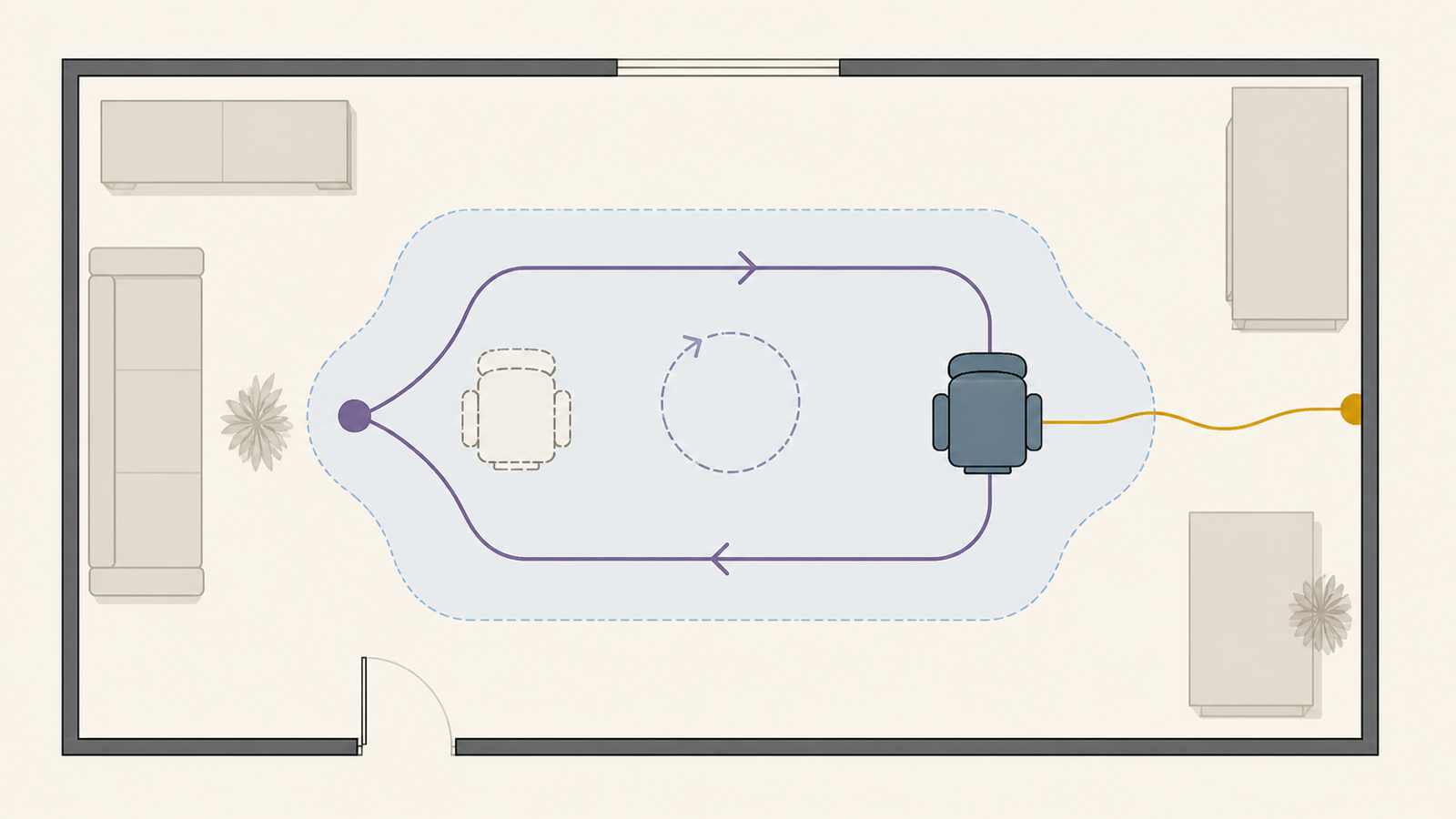
Define the usable zone from the intended route
The usable zone is not the room’s wall-to-wall area. It is the part of the room occupied by one named session route after fixed furniture, both chair states, cables, and excluded contact surfaces are drawn. A bedroom, office, or apartment label says nothing about the dimensions that remain for a particular route.
Name the session route before measuring. Use one stable sentence:
Start at [reference] → complete [named standing movement] → move to [chair reference] → complete [named seated movement] → stand → return to [start reference].
The standing and seated movements are reader-defined. This article does not prescribe a step length, turn angle, reach, chair type, cable method, route width, or minimum clearance. If a movement will not be used in the named session, it does not belong in this acceptance record.
Build the measured usable-zone map
Use a top-down sketch or grid and complete every row below. The dimensions are observations of this room in its recorded state. They are not recommendations for another room, headset, tracker method, chair, or person.
| Map field | Reader-measured record | Pass signal for this map | If missing or changed |
|---|---|---|---|
| Measurement reference | Chosen unit, sketch orientation, fixed reference edges, date, and the room state being mapped. | Every later dimension can be located from the same references. | Record unknown; do not compare measurements taken from different origins. |
| Start position | Foot or standing reference, facing direction, and the visible landmarks used to find it again. | The reader can return to the same recorded reference without estimating a new start. | Choose a reproducible reference before testing the route. |
| Standing route | The measured envelope of the one named standing movement and return, including the reader’s real body, controllers, headset path, and any tether used in that route. | The whole named route remains inside the mapped envelope on the unchanged repeat. | Mark the first edge crossed or contact observed; do not call tracking performance the cause. |
| Chair parked state | Chair footprint and orientation while the standing route is active. | The chair remains at its recorded parked reference during the standing route. | Record the first observed chair movement or route overlap. |
| Chair seated state | Chair footprint and orientation for sitting, including the position it actually reaches after the transition. | The chair reaches the same recorded seated state on the unchanged repeat. | Record the changed chair edge or orientation rather than assigning a cause. |
| Seated route | The measured envelope of the named approach, intended chair contact, seated movement, stand, and return. | Planned chair contact occurs where recorded, and no new contact appears on the repeat. | Mark the first unplanned contact surface or unmeasured edge. |
| Cable and contact lines | Actual session cable paths plus intended and excluded chair, floor, furniture, clothing, or equipment contacts. | Cables and declared contact states match the map through both routes. | Record which line or contact state changed; do not invent a universal routing fix. |
| Platform boundary state | Exact headset/runtime, boundary mode or Room Setup state, and the state expected during the named route. | The same expected platform state appears during the original run and unchanged repeat. | Keep the physical map result separate and hand the platform state to its owning documentation. |
The map passes as a measurement record only when every required field is measured or explicitly marked unknown. An unknown field does not make the room unusable; it makes the route decision incomplete.
Keep platform boundaries separate from the contact map
A platform boundary is one layer of the record, not the usable-zone map itself. Meta’s current Quest boundary documentation separates Stationary and Roomscale modes and lets the user adjust the boundary. Those platform modes and their current dimensions are Meta-specific; they are not universal FBT room-size thresholds.
Valve’s current SteamVR Chaperone FAQ says Chaperone indicates the boundaries designated during setup but does not identify physical objects inside the play area. Therefore, record the platform-boundary state and the reader’s chair, cable, and contact map as separate evidence. One cannot fill the other.
Valve’s current Index Setup Guide publishes a device-specific Room Scale requirement and says standing-only or seated setups require less space. That requirement belongs to the Index and SteamVR configuration named by Valve; it is not a universal FBT threshold and is deliberately not copied into this route record.
HTC’s official VIVE Cosmos user guide likewise separates room-scale from limited-space or stationary use and instructs users not to draw the play-area boundary through occupied furniture such as a table or chair. Treat that as VIVE Cosmos setup ownership, not a universal room layout. Record the exact headset and mode, then follow its current instructions before accepting the route.
This article does not choose or configure a headset boundary. If the boundary or play-space state is unknown, record that field as incomplete and use the owning platform instructions before the acceptance matrix. Do not change lighting, setup, calibration, or tracking settings during the room comparison.
Name the standing and seated routes before testing
The standing route begins and ends at the recorded start. It contains only one movement the reader expects to repeat in the named session. Record the movement name, its measured envelope, the chair’s parked state, cable state, and the expected platform-boundary state.
The seated route begins at the same start and includes the path to the recorded chair state, the intended sit, one reader-named seated movement, the stand, and the return. Sitting on the chair is an intended contact. A cable, chair edge, furniture edge, or equipment contact is accepted only when it was declared in the map and repeats in the same state; otherwise record it as unplanned rather than silently redrawing the route after the test.
Do not adjust furniture, chair position, cable path, start reference, movement, boundary mode, setup, or calibration between the first run and its unchanged repeat. If a field changes, the comparison stops and the map receives a new version.
Complete the chair-transition acceptance matrix
Run this matrix only after the exact headset, tracker route, and destination application’s owning setup is already complete. Current VRChat Full-Body Tracking documentation, for example, keeps application calibration and play-space state inside the platform workflow. This room article does not reproduce that workflow.
| Transition phase | Keep unchanged | Record | Pass signal for the named route |
|---|---|---|---|
| Start identity | Start reference, facing direction, equipment state, chair parked state, cable map, and platform-boundary state. | Whether every recorded state matches the map before movement. | No required field is missing or silently changed. |
| Standing route | The same reader-named standing movement and measured envelope. | First boundary-state difference, crossed map edge, chair movement, cable change, or unplanned contact; otherwise none observed. |
The route returns to the recorded start with the expected states and no unplanned contact. |
| Approach and chair state | The same start-to-chair path and recorded seated chair position. | Chair endpoint, cable state, intended chair contact, and first unplanned contact if present. | The chair and cable states match the map at the seated endpoint. |
| Seated route | The same named seated movement, chair state, equipment state, and contact definitions. | Whether the measured seated envelope and declared contacts remain unchanged. | The named movement completes without a new map edge or unplanned contact. |
| Stand and return | The same chair-to-start path, facing direction, and route endpoint. | First changed surface, or none observed; final start reference and chair state. |
The reader returns to the recorded start and the chair ends in its declared state. |
| Unchanged repeat | Every prior route, room, chair, cable, equipment, boundary, and movement field. | repeat matched, repeat differed, or not tested, plus the first differing surface. |
Both records show the same accepted route states; this is not a tracking-performance score. |
If the first run passes but the unchanged repeat differs, the route is not yet repeatable. Preserve both records. Do not average them, keep the preferred result, or claim that the room passed.
Record one first observed surface and hand it off
When the route does not pass, name only the first observable surface that differed from the map. Do not turn timing into a root cause.
- Physical-zone surface: start reference, standing envelope, chair state, seated envelope, cable line, or declared contact changed. Revise this map, assign it a new version, and repeat the same matrix.
- General setup or calibration state: stop the room test and use the general setup-stage owner. Do not add a setup sequence here.
- Selected SlimeVR-to-VRChat implementation state: use the SlimeVR implementation owner without copying its connection, assignment, wearing, calibration, or output workflow.
- Lighting or changed-room tracking observation: preserve the accepted reference state and use the lighting and room-layout diagnosis owner. This page does not diagnose lighting.
- Recurring apartment conversion or storage operation: use the apartment room-operations owner. This map does not prescribe furniture-moving or storage routines.
- Broader active-session safety question: use the active-session safety owner. Passing this route matrix is not a complete safety assessment.
Choose one handoff from the first observed difference. Following several repair owners at once changes the test and makes the original room record unusable as a comparison.
Save a route-specific acceptance record
Save the map version, room state, reader measurements, start reference, standing route, both chair states, seated route, cable/contact map, platform-boundary state, initial result, unchanged-repeat result, and first observed differing surface. Use one of three record states:
- Route accepted for this named session: every required field is measured, both runs match, and the pass signals are present.
- Hold — map incomplete: a required dimension, state, contact, or repeat remains unknown or untested.
- Hold — owner handoff: the first observed difference belongs to setup, implementation, lighting diagnosis, apartment operations, or broader safety.
An accepted record is evidence only for the named room state, equipment route, movements, and time of observation. It does not prove a minimum room size, future room state, another user’s route, compatibility, calibration quality, sensor accuracy, latency, coverage, reliability, or an uninterrupted session.
Frequently asked questions
What is the minimum room size for full body tracking?
This article sets no universal minimum. Measure the exact standing and seated routes you intend to use, record unknown dimensions honestly, and apply the current requirements of the named headset and tracking system separately. A vendor’s boundary-mode dimensions are not a universal FBT threshold.
Does total floor area tell me whether the route will work?
No. Total area does not record the start position, movement envelope, chair footprint, cable lines, excluded contacts, or platform state. The usable-zone map is route-specific.
Can one small room support both standing and seated use?
Only the completed map and unchanged transition record can answer for that room. Record the chair in parked and seated states, test the named standing and seated routes, and avoid turning one successful movement into a general result.
Does a headset boundary detect my chair and cables?
Do not assume it does. Boundary behavior belongs to the exact platform. Valve specifically states that SteamVR Chaperone indicates designated boundaries but does not identify physical objects inside the area, so the contact map remains separate.
What if the route passes once but the repeat is different?
Record both results and hold the route. Name the first surface that differed, keep the test unchanged, and use the matching owner handoff rather than selecting the preferred run.
Does an accepted small-room route prove tracking performance?
No. It shows only that the measured physical route and recorded platform state repeated under the named conditions. It does not prove accuracy, latency, coverage, reliability, compatibility, calibration quality, or a full-session result.
Official sources
- Meta Quest Help: Set up your boundary
- Valve Steam Support: SteamVR Chaperone FAQ
- Valve Steam Support: Valve Index Setup Guide
- HTC VIVE: VIVE Cosmos User Guide
- VRChat Docs: Full-Body Tracking
Official sources were checked on August 27, 2026. No room dimensions, device performance, customer outcome, or first-hand FBTKit test is supplied. This worksheet does not replace the current instructions or safety guidance for the exact headset, tracker system, application, room, or user.
