
Blog
How to Store Full Body Tracking Gear Between Sessions
Jul
Store full body tracking electronics, straps, and cables in separate labeled zones after each session. Keep any damp or questionable item out of the normal ready area, give every tracker a stable ID, and use the exact device guide for power-off, charging, temperature, and long-gap battery instructions. There is no reliable universal storage percentage or recharge interval for every tracker.
A useful storage system should answer three questions at a glance: Did every item return? Is anything waiting for cleaning or inspection? Which devices are ready for the next pre-session check? You do not need a special cabinet. You need visible zones and a repeatable count.
Run a short return check after the session
- Bring every tracker, strap, cable, and receiver to one return surface.
- Count devices by their stable IDs before removing temporary body-role labels.
- Separate anything damp, unusually warm, dirty, damaged, or uncertain.
- Follow the exact device instructions for powering down or moving into a verified charging routine.
- Return only checked items to their labeled storage zones.
This is a sorting step, not a deep cleaning or troubleshooting session. The goal is to prevent one tracker from disappearing inside a strap, one cable from losing its assigned device, or a damp item from being closed into the regular storage area.
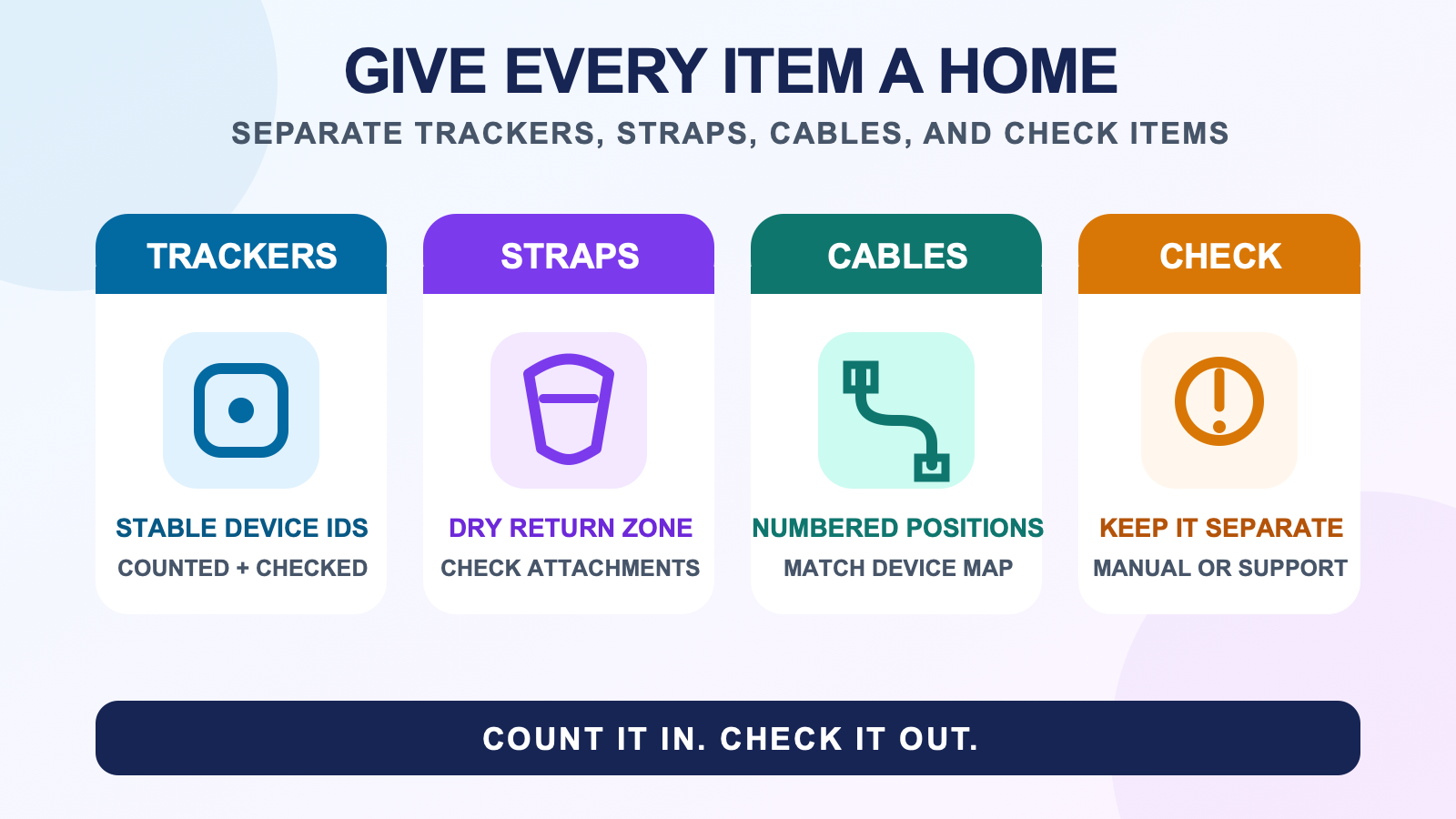
Give trackers, straps, and cables different zones
| Zone | What belongs there | What stays out |
|---|---|---|
| TRACKERS | Counted electronics with stable IDs and the state required by their current guide. | Damp, damaged, unexpectedly warm, or unverified devices. |
| STRAPS | Dry straps grouped by their own labels or sizes. | Straps waiting for material-specific cleaning or inspection. |
| CABLES | Mapped cables in numbered positions with no pull on the connector ends. | Unknown cables or cables assigned to the travel kit. |
| CHECK | Anything that needs a manual, cleaning, support, or replacement decision. | Items already counted as ready. |
Open trays, a divided drawer, or a small shelf can all support the same map. Choose a layout where the device IDs remain visible and the cables do not sit under the electronics. Do not treat a closed case as ready storage when an item has not passed the return check.
Keep a stable device ID separate from body role
Give each tracker a permanent ID such as T1, T2, or T3. Put waist, left foot, right foot, or another supported role on a removable marker if you change roles. This prevents the storage map from breaking when a tracker moves to a different body location.
Use the same stable ID in the cable and charging organization guide. A tracker, its mapped cable, and its home slot can stay connected in the record even when its body role changes.
Do not seal damp straps with electronics
If a strap is damp after a session, keep it out of the electronics zone and out of a closed pouch. Follow the material instructions before washing or drying it. The strap cleaning guide covers that process while keeping electronics out of the cleaning area.
Inspect attachment points and closures while the strap is separate. Fraying, stretched sections, unreliable fastening, or hardware that no longer holds the tracker as intended goes into CHECK. Use the strap replacement guide instead of returning it to the ready zone because it still looks tidy.
Use device instructions for electronics and long gaps
The official SlimeVR safety guide illustrates why storage advice must name the device. For Official SlimeVR Trackers, it says to avoid water, moisture, and heat, switch the product off after use, store it away from direct sunlight, and follow its instruction for prolonged non-use.
Those rules apply to Official SlimeVR Trackers. They do not establish a storage temperature, charge percentage, or recharge interval for every SlimeVR-compatible tracker or for FBTKit hardware. The current FBTKit product page does not publish those values.
If the kit will sit unused, create a calendar note that points to the exact model guide. Record the maker’s instruction in that note instead of using a generic percentage copied from another battery product. When the documentation is missing, keep the long-gap battery field marked VERIFY and use the manufacturer’s support path.
Keep daily storage and travel packing separate
A travel pouch is not automatically the best daily home. Travel packing adds transport, cable movement, and a second count location. Keep the home slots unchanged and mark any item that has moved to the travel kit. The full body tracking travel checklist covers departure and return counts.
When the kit comes home, every item should pass through the return surface again. Do not move the whole closed travel pouch directly into the ready zone.
Take gear out through one pre-session check
Remove devices by stable ID, then confirm their physical condition and charging state against the current guide. Use the charging and pre-session checklist for the session-ready decision.
If a tracker looks ready but software cannot find it, move to the trackers-not-detected checklist. Storage can preserve a count and state label, but it cannot prove that the network, receiver, software, or body assignment is working.
No first-hand storage photo, long-gap battery record, or material list was available for this article. The workflow stays with zones, IDs, and explicit exceptions instead of promising a storage condition that has not been verified.
Plan storage around the exact kit
The FBTKit LSM6DSV SlimeVR-Compatible Full Body Tracking Kit page is the current source for kit facts. Use the exact device documentation for storage and battery requirements, then assign one visible home slot to every confirmed tracker, strap, and cable.
FAQ
Can I store trackers with the straps still attached?
Only when the strap is dry, the tracker has passed the return check, and the device and material instructions allow that arrangement. Separating them can make counting, cleaning, and attachment-point inspection easier.
Should trackers be fully charged before storage?
Follow the exact device guide. Charging and long-storage instructions vary, so do not apply one percentage or recharge interval to every full body tracker.
Can I keep full body tracking gear in a closed case?
Use a closed case only after every item is dry, checked, and stored within its device and material requirements. Do not seal damp straps, unexpectedly warm electronics, or an item waiting for inspection into the ready case.
How should I store charging cables?
Keep each verified cable in a numbered position tied to its device ID. Arrange it without tension at the connector and keep unknown or travel-assigned cables outside the ready cable zone.
What should I check when taking FBT gear out of storage?
Confirm the device count, physical condition, stable IDs, mapped charging state, and any unresolved CHECK item. Then use the exact device instructions and the pre-session checklist before connecting to VR.
