
Blog
Why Your VR Legs Drift and How to Troubleshoot
Jul
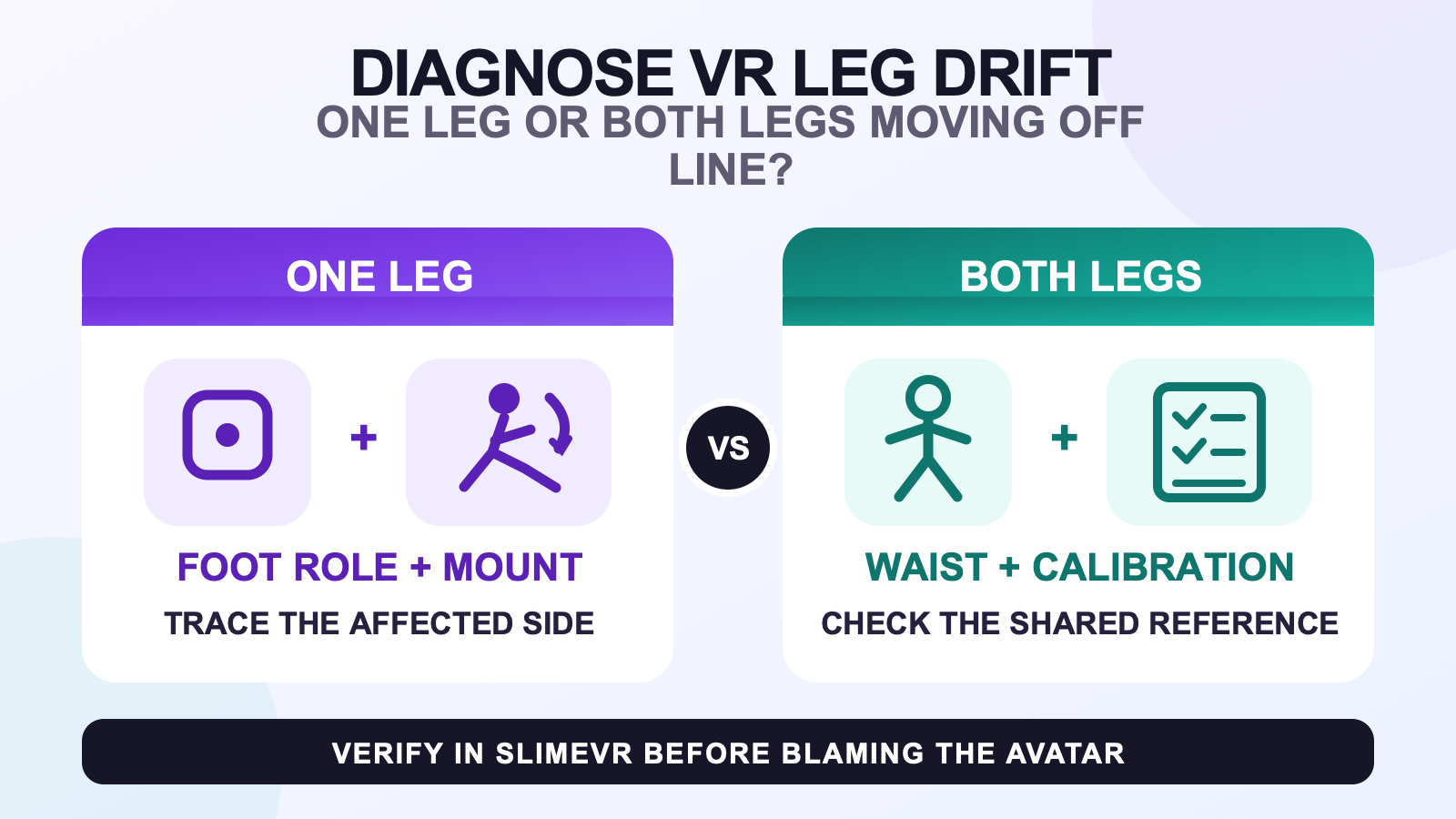
VR leg drift is a growing offset, not every lower-body tracking fault. One or both virtual legs begin close to your real stance, then gradually rotate, slide, or pull away as you step, turn, squat, sit, or stand. Record which side moves and which pose exposes it before changing anything. That evidence tells you whether to start at one foot, the shared Waist reference, calibration, or the avatar.
A point that jumps or shakes from frame to frame belongs in the rapid tracking jitter guide. A skeleton that is already facing or bending the wrong way immediately after calibration belongs in the bad-calibration route. Drift begins from a usable pose and develops an offset. Keeping those symptoms separate prevents a reset from erasing the clue you needed.
Confirm that the offset is progressive
Return to a neutral standing pose and look at the tracker or skeleton view in SlimeVR or SteamVR before judging the avatar mirror. Note the original direction of each foot and the position of the legs under your body. Then repeat one simple movement that revealed the problem. Do not change your avatar, straps, roles, and calibration in the same test.
| Observation | First route | What not to assume |
|---|---|---|
| One foot or leg moves away while the other side remains repeatable | Inspect the affected Foot role, side, and physical mounting | Do not rebuild every tracker assignment |
| Both legs rotate or shift together relative to the torso | Inspect the Waist role and the shared calibration reference | Do not assume that both foot trackers failed at once |
| The offset appears after a particular turn, squat, or sit-to-stand change | Repeat that same transition while watching the physical devices and tracker view | The pose is a trigger clue, not proof of one cause |
| Only one avatar shows the bad leg line | Verify the tracker view, then compare with a known-good avatar | Do not diagnose hardware from one rig |
Useful notes are concrete: “the right Foot point begins straight and turns outward after the same pivot” or “both legs move left when I return from a squat.” Avoid attaching a diagnosis to the note. The purpose is to see whether the fault stays on one side, follows a shared body reference, or appears only after the data reaches an avatar.
Trace a one-leg offset from the foot upward
When only one side drifts, compare the affected foot with the stable side before touching calibration. Confirm that the saved role and left/right assignment match the physical device. SlimeVR’s current mounting guidance places a Foot tracker on top of the foot, with tracker “up” pointing toward the ankle and “front” pointing toward the ceiling. The foot tracker placement guide covers the deeper footwear and movement checks.
Stand neutral and compare the two devices rather than copying a remembered angle. If the affected tracker is now rotated, shifted, or sitting at a different body point than it did at the start, correct that physical difference and repeat the same motion once. If clothing contact or strap movement is the uncertain part, use the VR tracker strap fit guide; this drift page does not prescribe tension.
If the device has not moved, look at the virtual tracker point. Does only the Foot point rotate, or does the upper leg also move away? Does the same pivot expose the error again? A fault that remains isolated to one saved role justifies a local role or mounting check. It does not justify changing both legs, the Waist role, body proportions, and the avatar together.
Trace a two-leg offset through the shared torso reference
When both legs move in the same direction, widen the view. Check whether the whole virtual skeleton changes heading or whether the legs shift relative to a stable upper body. This distinction matters because two legs can share a torso and calibration reference even when both physical foot mounts look unchanged.
Verify that the device assigned as Waist is actually worn at the Waist point. SlimeVR’s current guidance places that role above the hip, around belly-button level, where it can register bending. The Hip role is a different, lower point near the belt line. The waist tracker placement deep dive explains the sitting and torso-movement checks without turning this article into a general placement guide.
Use the pose that revealed the two-leg offset. If it follows a squat or bend, watch whether the Waist device moves with your torso and returns to the same physical point. If it follows a turn, compare the direction of the whole skeleton before and after the turn. These observations do not prove that Waist is the cause; they tell you whether to investigate a shared reference before treating two feet as unrelated failures.
Keep mounting correction separate from reset choice
A reset cannot preserve useful evidence if the device role or physical direction is still wrong. First confirm role, side, body point, and mounting orientation. Then return to the same neutral pose and decide whether the remaining fault is progressive drift or a calibration that is wrong from the start.
If the skeleton is wrong immediately and several points share the same incorrect direction, use the bad-calibration reset decision guide. It owns the distinction between reset types and the verification sequence. Post 1821 only tells you when the symptom has crossed from gradual drift into that route.
After the chosen calibration action, reproduce the original movement without another change. A clean starting pose is not enough: the test passes only when the same foot, turn, bend, or sit-to-stand transition no longer recreates the progressive offset in the tracker view.
Judge the avatar after the tracker view passes
SlimeVR’s body-proportion guidance says to compare SteamVR tracker positions with your real joints, not only with an avatar’s joints. That makes the application boundary useful: if tracker points remain correctly directed and repeatable outside the avatar, but one avatar’s legs still pull away, the apparent drift may belong to that avatar’s proportions, offsets, or calibration.
Switch to a known-good avatar without changing the physical setup. Recalibrate through the route required by the application, then repeat the same neutral stance and trigger motion. The controlled avatar comparison routine keeps that test focused. If every avatar shows the same growing offset in the underlying tracker view, return to the tracker-side path.
Retest one unchanged movement sequence
- Stand neutral and note the direction of both Foot points and the position of both legs.
- Perform the exact turn, step, squat, or sit-to-stand change that previously exposed the offset.
- Return to neutral and state whether the right side, left side, or both sides moved away.
- Make one correction in the selected route: physical mount, saved role, calibration state, or avatar.
- Repeat the same movement with every other variable unchanged.
If you discover that the original setup sequence itself was incomplete, return to the broader setup and calibration workflow. That page owns the end-to-end order. This page should remain a symptom-led decision tree.
Preserve the evidence if the drift remains
Record the affected side, whether the offset grows or is present immediately, the physical pose that exposes it, and whether it appears in SlimeVR, SteamVR, one avatar, or every avatar. Add the saved tracker role and mounting direction you verified. A short before-and-after recording of the same movement is more useful than a list of unrelated settings changed during the session.
Once the symptom route is clear, use the current FBTKit product record to confirm the available tracker-count configurations and setup context for your hardware. Pack size does not decide whether the offset belongs to a foot, shared reference, calibration, or avatar.
FAQ
What does gradual leg drift look like in full body tracking?
It starts from a usable leg pose and develops an increasing position or direction offset during repeated movement or a pose change. Rapid jumping is jitter, while a skeleton that is wrong immediately belongs to the bad-calibration route.
Why does only one virtual leg move away from its starting line?
A one-leg pattern narrows the first check to that side’s role, left or right assignment, physical foot mount, and mounting direction. Compare it with the stable side and change one item before repeating the same movement.
Why can both virtual legs shift together when both foot mounts look unchanged?
Both legs share torso and calibration references, so inspect whether the Waist role or the whole skeleton heading also changes. This pattern is a routing clue, not proof that the Waist tracker caused the drift.
Should I recalibrate as soon as my VR legs begin to drift?
First record the affected side and trigger, then verify physical mounting, saved roles, and mounting direction. Recalibrate only after those checks so the same movement can show whether the chosen correction worked.
How can I tell whether one avatar creates the apparent leg drift?
Confirm that the tracker view remains stable, switch to a known-good avatar without changing the physical setup, recalibrate in the application, and repeat the same movement. An issue limited to one avatar belongs to the avatar route.
Official SlimeVR sources
- SlimeVR common issues
- SlimeVR tracker roles and mounting points
- SlimeVR tracker reset verification
- SlimeVR body proportions configuration
Official documentation and the current FBTKit product page were checked on August 10, 2026. No owner drift test, customer result, universal time threshold, or guaranteed fix is claimed.
