
Blog
VR Tracker Buying Questions for Full Body Tracking
Jul
Quick answer: when buyers search for a VR tracker, they may mean several different things: full body tracking, headset tracking, controller tracking, hand tracking, face or eye tracking, camera tracking, or game accessories. If your goal is waist and foot movement for VRChat or social VR, filter the search toward full body tracking and verify your headset, app, room, tracker count, straps, charging, and support path.
The phrase “VR tracker” is broad. That is why search results can feel messy. One product may be for avatar body movement. Another may be for a headset ecosystem. Another may be a camera, a controller accessory, or a toy-style game input. The words look similar, but the buying decision is not the same.
This checklist is for people who used generic tracker language and realized they may need a full body tracking setup instead. For the broader purchase path, start with the full body tracking VR buying guide, then come back here to clean up the tracker question.
First, Define What You Want Tracked
Do not start with the product name. Start with the body part or behavior you want the avatar to show. Do you want hips, feet, knees, standing posture, seated leaning, or dance movement? That points toward full body tracking. Do you want finger gestures? That points somewhere else. Do you want facial expression? Different category. Do you want a gun-shaped controller or a fitness accessory? Also different.
This one question saves time: “What should change inside the VR app after I buy this?” If the answer is “my avatar should move more like my lower body,” you are probably shopping for full body tracking rather than a generic VR tracker.
Separate Full Body Tracking From Other Tracker Types
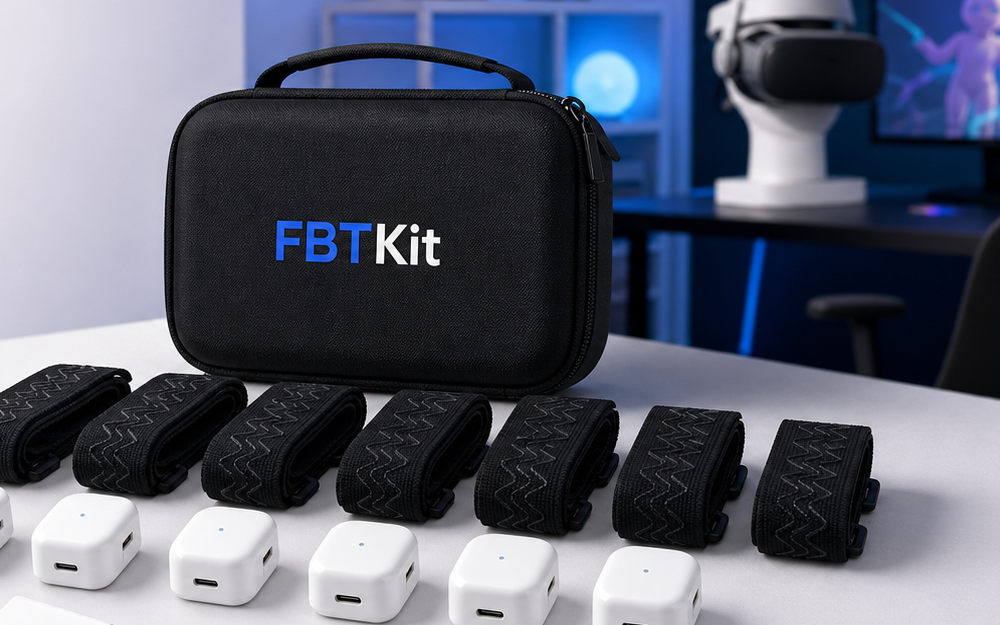
Full body tracking usually means adding wearable tracking points beyond the headset and controllers so an avatar can show more body movement. The buying checks include tracker count, placement, straps, charging, calibration, compatibility, and software workflow.
Other VR tracker searches may involve different goals. Hand tracking may reduce controller use. Face or eye tracking may focus on expression. Camera-based tracking may depend on visibility. Controller or headset accessories may solve comfort or gameplay problems. The overlap in wording is real, but the products do not solve the same job.
Use Your App As The Buying Filter
The right tracker depends on where the movement needs to appear. Many buyers care about VRChat, social VR rooms, avatar testing, streaming, or dance spaces. If that is your goal, say it directly when comparing products or asking support. “I want full body tracking for VRChat with my current headset path” is much clearer than “I need a VR tracker.”
App context matters because each workflow has its own compatibility and setup expectations. A tracker that makes sense for one route may not make sense for another. Avoid universal assumptions. The safer move is to verify your headset, app, connection path, and room before paying.
Check Tracker Count And Placement
Once you know you are shopping for full body tracking, look at body points. Which trackers are included? Where are they intended to be worn? What movement are they meant to communicate? Waist and feet are common buyer priorities because they make posture and lower-body movement more visible.
More points can add expression, but they can also add more charging, wearing, placement checks, and troubleshooting. Do not let a larger count impress you before you understand the routine. The best setup is the one you can use consistently.
Think About Straps And Comfort Early
Generic tracker searches often focus on the electronic object. Full body tracking is more physical than that. You wear the gear. It touches clothing, socks, shoes, legs, waist, or other placement points. It moves when you move. That makes straps and comfort part of the purchase, not an accessory afterthought.
Picture your real session. Sitting at a desk is different from dancing. Standing in a small bedroom is different from moving in an open play space. Streaming for two hours is different from testing an avatar for ten minutes. If the wearing routine sounds annoying, the tracker may be technically correct and still wrong for you.
Ask The Compatibility Question Precisely
“Is this VR tracker compatible?” is too vague. Compatible with what? Which headset? Which app? Which PCVR route? Which room? Which body points? Which setup habit? The more precise question gets the better answer.
If you are still learning the category, read what full body tracking in VR means. If your question is specific to your setup, use the FBTKit contact page and include the headset, app, movement goal, and any existing gear you plan to use.
Do Not Let Price Hide The Real Job
Exact pricing belongs on the current product page. For the buying decision, compare the full job: body movement, compatibility, wearing comfort, setup time, support, and included items. A cheap item that solves the wrong tracker problem is not a bargain. A more complete path may still be wrong if it does not fit your app or habits.
Once your intent is clear, product comparison gets calmer. You are no longer browsing every object called a tracker. You are deciding whether a full body tracking kit fits your VR routine.
Check The Full Body Tracking Kit
Review current kit details and ask a setup-specific question if your generic VR tracker search is really about full body tracking.
FAQ
What does a VR tracker mean?
It depends on context. A buyer may mean full body trackers, headset tracking, controller accessories, hand tracking, face tracking, camera tracking, or another VR input device.
How do I know if I need full body tracking?
If you want your avatar to show hip, foot, posture, seated lean, or dance movement beyond head and hands, full body tracking is likely the category to research.
Are all VR trackers compatible with VRChat?
No universal claim is safe. Compatibility depends on the tracker type, headset path, software workflow, and setup. Verify your specific route before buying.
Should I choose by tracker count first?
No. Start with your movement goal and app workflow. Then compare tracker count, placement, straps, charging, comfort, and support.
Where should I ask if my setup is unusual?
Use the contact page and include your headset, app, connection path, and what movement you want to track. Specific questions are easier to answer accurately.
